Linux / Unix host
Connect a Linux server to Jutsu. You install a small agent on the host. It ships the host's authentication and sudo events to Jutsu, from /var/log/auth.log or /var/log/secure and from the systemd journal for SSH, sudo, logins and cron. It can also receive syslog from other devices on your network, and it runs osquery for compliance posture. Jutsu detects threats in those events automatically.
| Time | About 10 minutes per host |
|---|---|
| You need | A Linux host that runs systemd, with apt-get (Debian, Ubuntu) or dnf/yum (RHEL, Fedora and their rebuilds); curl; root or sudo rights; and the Owner or Admin role in your Jutsu organization |
| Network | Outbound HTTPS (port 443) to api.jutsu.ai. The installer also downloads Vector from setup.vector.dev and Vector's package repository, and osquery from pkg.osquery.io |
| Collected | linux.auth. The token also accepts syslog.generic |
You register a collector in Jutsu, which gives you an install command with a one-time token. Then you run that command in a shell on the host.
Step 1 - Open Integrations
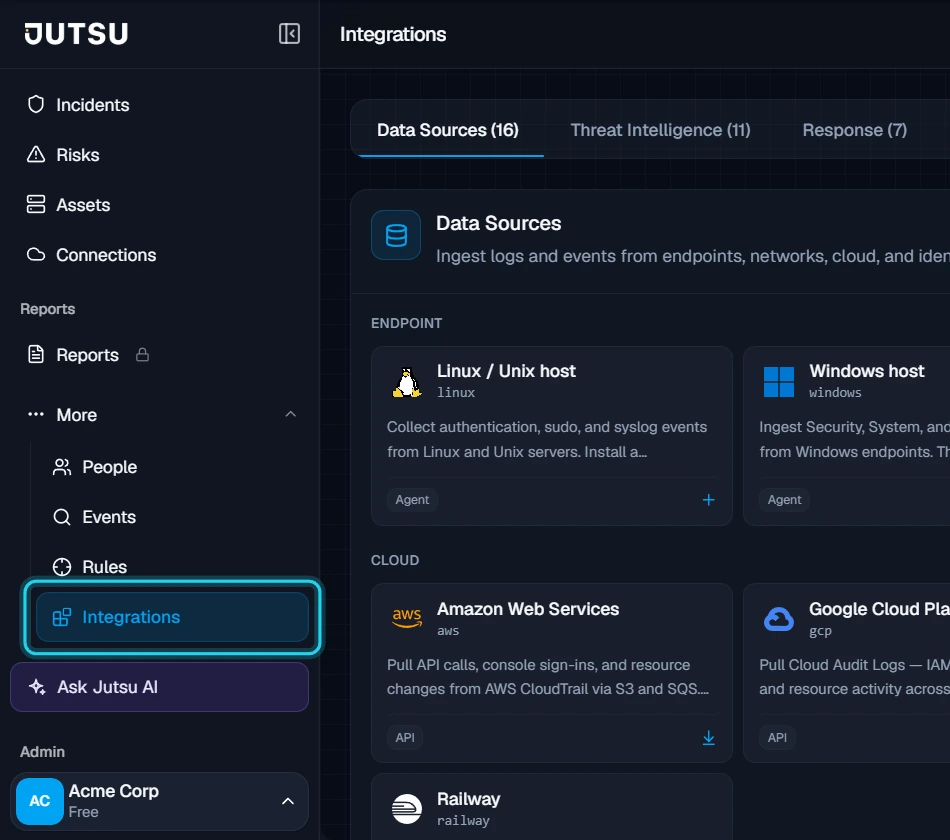
Go to app.jutsu.ai and select Integrations in the left navigation. It sits under More. The Data Sources tab opens by default.
Step 2 - Select the Linux / Unix host card
In the Endpoint section, select the Linux / Unix host card. The Register collector dialog opens.

The card doesn't open? Adding integrations needs the Owner or Admin role in your Jutsu organization. For Analysts, Responders, and Viewers the catalog is read-only.
Step 3 - Register the collector
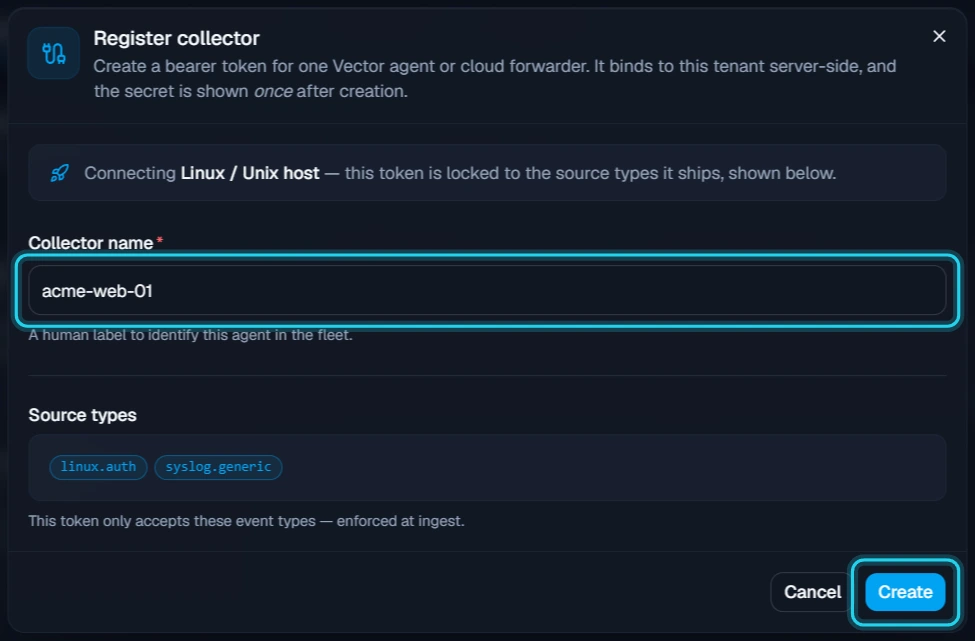
Under Collector name, replace the suggested linux-01 with a name that identifies the host, such as its hostname or role, for example acme-web-01. The source types are fixed by the Linux / Unix host card: linux.auth and syslog.generic. The token only accepts those.
Select Create.
Register one collector for each host. Creating it uses one connected-asset slot on your plan.
Step 4 - Copy the install command
The Collector registered dialog shows the install command. It contains the collector's token, which Jutsu shows only once, so copy the command before you select Close. Select Copy command.
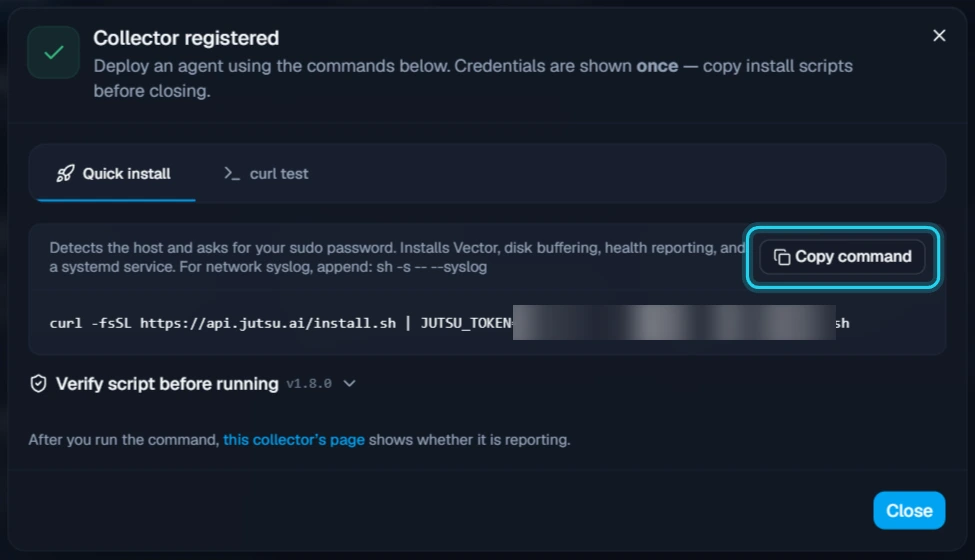
The command downloads a small bootstrap script from Jutsu and pipes it to sh. The bootstrap checks your token, downloads the Linux installer, verifies the installer's SHA256 checksum, and only then runs it with sudo.
Collect syslog from other devices too? To make this host a syslog receiver for routers, firewalls, or other Unix systems, end the command with sh -s -- --syslog instead of sh. The agent then listens on port 514 (TCP and UDP). Point your devices at the host, and allow port 514 through its firewall.
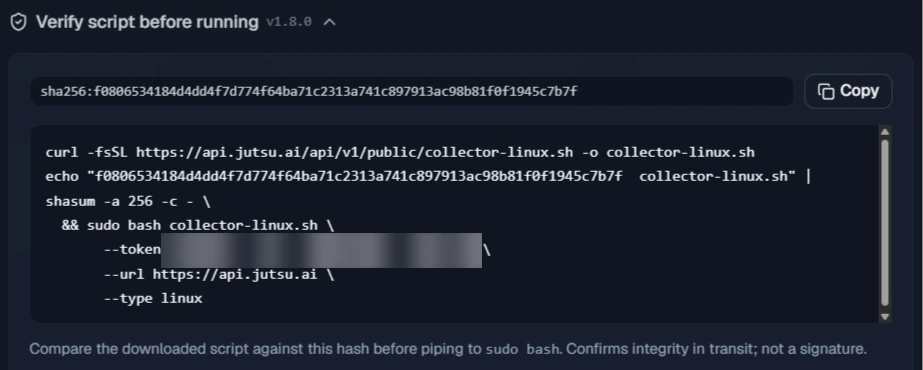
If you'd rather check the installer yourself before it runs, expand Verify script before running and copy that command instead. It downloads collector-linux.sh, checks it against the SHA256 hash Jutsu shows, and only runs it with sudo bash if the hash matches.
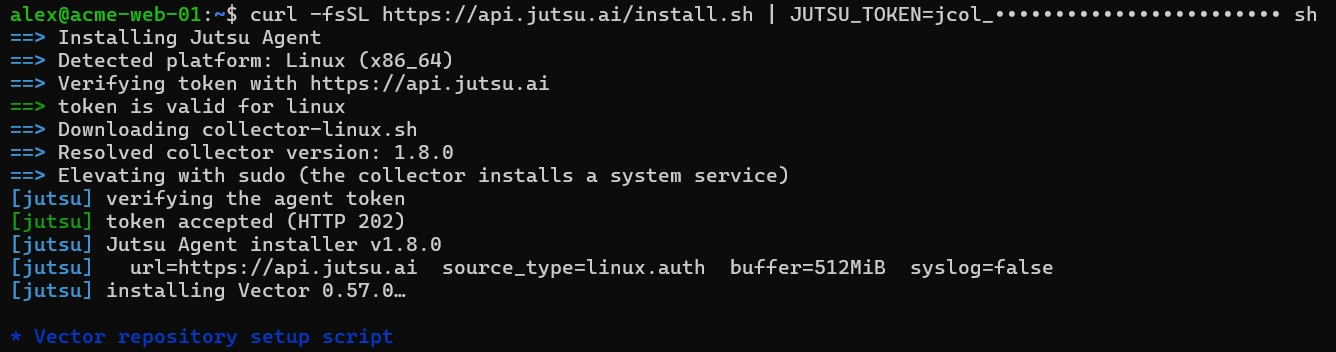
Step 5 - Run the command on the host
Open a shell on the Linux host, for example over SSH, as a user who can use sudo. Paste the command and press Enter.
You don't need to start a root shell first. The installer elevates itself with sudo when it installs the service, and sudo asks for your password at that point. Running it as root works too.
Step 6 - Let the installer run
The installer prints each step as it goes. On a typical host it takes one or two minutes, most of it spent downloading packages. It:
- Checks the token with Jutsu (token is valid for linux). If Jutsu rejects the token, it stops before installing anything.
- Downloads the Linux installer, verifies its checksum, and elevates with
sudo. - Installs the pinned version of Vector, the log shipper, from Vector's package repository, and holds it at that version.
- Writes
/etc/vector/vector.yamland a systemd drop-in that holds the token, validates the configuration, and starts the vector service. - Checks that Jutsu's API and data endpoints are reachable, and installs a timer that reports the host's identity every 30 minutes.
- Waits up to 60 seconds for the first event to reach Jutsu.

- Installs osquery and enrolls it for compliance posture.
The apt error is expected: On Debian and Ubuntu, the osquery step prints E: Unsupported file /tmp/…/osquery-pkg given on commandline. apt-get refuses the downloaded package file, so the installer installs it with dpkg instead, which is what the Selecting and Unpacking lines after it show. The install carries on to osqueryd is active.
Step 7 - Confirm the installer finished
Wait for Jutsu Agent installed. and your shell prompt to return. The summary lists the service, the logs, the config file, the disk buffer, where data and health reports go, the host identity timer, and osquery.
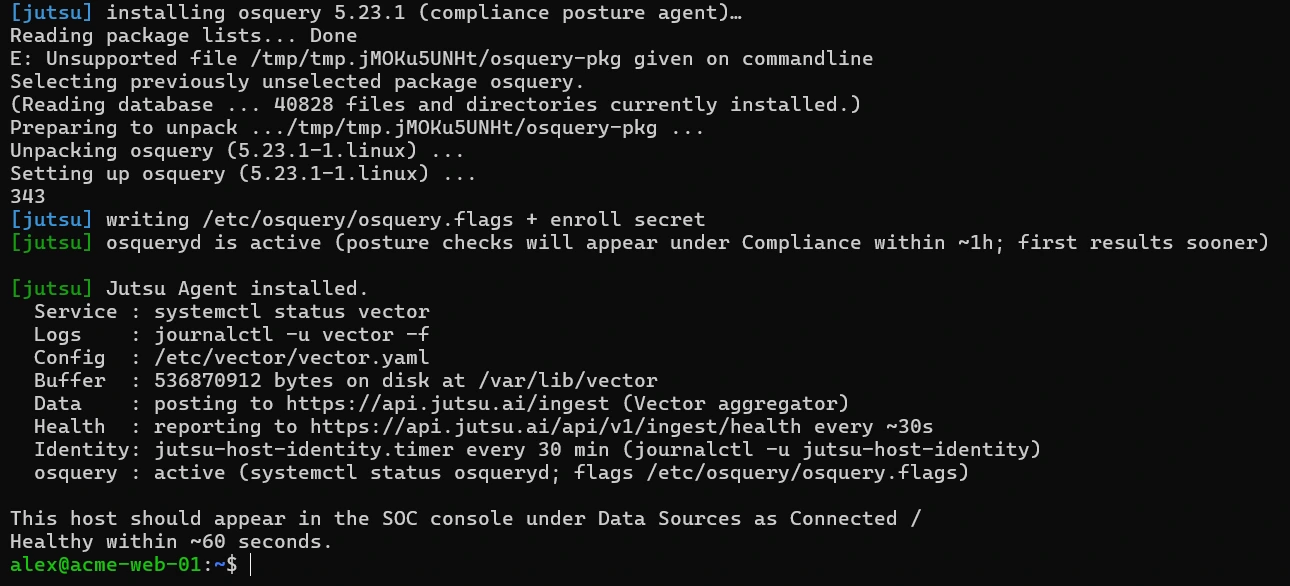
events are reaching the SIEM (Figure 7) means the first event already landed. On a quiet host the installer may instead say that no event has arrived yet. That's fine: check Jutsu after a few minutes.
Verify the connection
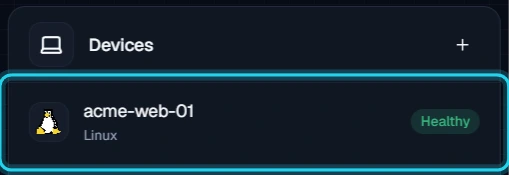
In Jutsu, open Connections. The collector appears under Devices as Healthy.
Open the collector. Its header shows Healthy · Reporting and when it was last seen.
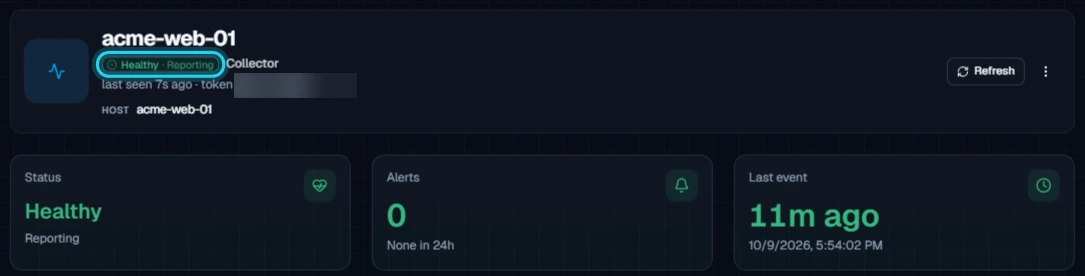
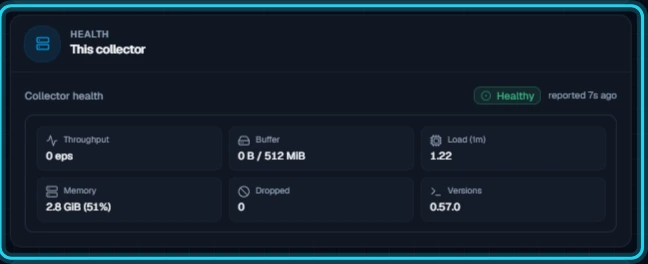
Further down the Overview, What's arriving counts the events of the last 24 hours by type. The Health card shows the latest heartbeat, with throughput, disk buffer use, load, memory, dropped events, and the Vector version. The agent reports its health about every 30 seconds.
Under Configure → Settings, the Details card lists the allowed source types, the minimum severity, the EPS limit, and when the collector was connected and last seen.
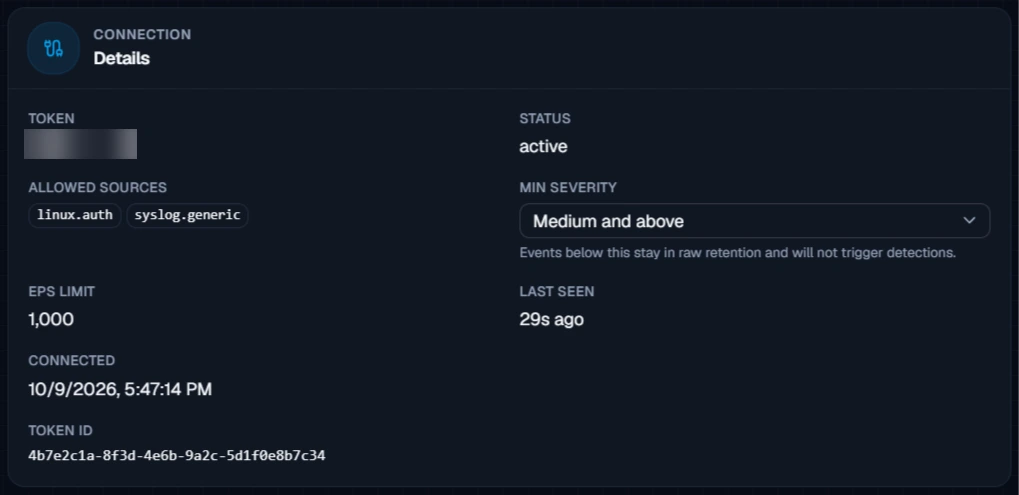
Quiet hosts: New collectors start with a Medium and above severity floor. Routine authentication events are kept in raw retention but won't show up as alerts. On a healthy host, What's arriving can count dozens of events while 0 of them are visible to detection.
Check on the host
You can also check the agent from a shell on the host:
systemctl is-active vector osqueryd
journalctl -u vector -n 50 --no-pager
curl -sS -o /dev/null -w '%{http_code}\n' https://api.jutsu.ai/health
Both services should be active, the journal shouldn't show repeated errors, and the health check should print 200.
What healthy looks like
| Connections | Healthy, under Devices |
|---|---|
| Collector page | Healthy · Reporting, last seen within the last minute |
| vector service | active, enabled at boot |
| osqueryd service | active, when posture collection is installed |
| Allowed sources | linux.auth, syslog.generic |
Troubleshooting
Start with the exact message the installer printed.
| Message or symptom | What to do |
|---|---|
| this looks like WSL | A Linux agent inside WSL only sees WSL, not Windows. Install it on the Linux host itself. For a Windows computer, follow the Windows host guide. |
| PID 1 here is '…', not systemd | You're in a container, a chroot, or a distribution without systemd. Run the command on the host itself. For container logs, use the Docker containers card instead. Alpine, OpenRC, and SysV hosts aren't supported yet. |
| curl is required but was not found on PATH | Install curl with your package manager, then run the command again. |
| the SIEM rejected this token | The token was rotated, revoked, or copied incompletely. Rotate the collector's token in Jutsu and use the new command. Nothing was installed. |
| could not reach https://api.jutsu.ai | The host can't make outbound HTTPS connections to Jutsu. Allow api.jutsu.ai on port 443 through your firewall or proxy. |
| this token was minted for …, but this host is linux | The token came from another card, such as macOS host. Register a collector from the Linux / Unix host card. |
| checksum mismatch | The download was corrupted or altered on the way. Run the command again. If it keeps failing, check for a proxy that rewrites downloads. |
| root is required to install a system service, and sudo was not found | Run the command as root. |
| no supported package manager (apt-get/dnf/yum) found | The installer supports Debian- and Red Hat-family distributions only. |
| could not download osquery | The host can't reach pkg.osquery.io. Allow it, or skip posture collection by ending the command with sh -s -- --no-osquery. |
| vector validate failed | The installer prints Vector's own error above this line. Fix what it names, then run the command again. |
| Installed, but the collector isn't Healthy | Run systemctl status vector and journalctl -u vector on the host, and check outbound HTTPS to api.jutsu.ai. The agent buffers events on disk (up to 512 MiB) and sends them once it can connect. |
Running the command again is safe: The installer rewrites the configuration and restarts the service on a host that already has the agent. Use the same command to repair an install or to apply a rotated token.
To move an existing install to the newest agent version, run curl -fsSL https://api.jutsu.ai/install.sh | sh -s -- --upgrade on the host. It reuses the token and settings already on the host.
Security and access
- The token only accepts
linux.authandsyslog.generic, and Jutsu enforces that at ingest. - The installer stores the token in a systemd drop-in,
/etc/systemd/system/vector.service.d/10-jutsu.conf, that only root can read. It is not written intovector.yaml. osquery's copy,/etc/osquery/enroll.secret, is also readable by root only. - To read the logs, the installer adds the
vectoruser to theadmandsystemd-journalgroups. - Jutsu shows the token once, in the Collector registered dialog. Copy the command straight into your shell and don't save it anywhere else.
Rotate the token
On the collector's page, open Configure → Settings and select Rotate token on the Credential card. Choose a Grace window in minutes, from 0 to 1440 (the default is 60). The old token keeps working until the window ends, and 0 stops it immediately. A Token rotated dialog shows new install commands. Run the new command on the host as in Steps 4 to 7. The installer replaces the existing setup in place.
Remove the agent
Removing a Linux host takes three parts: archive the collector in Jutsu, run the uninstaller on the host, then remove the leftover packages. Archiving alone doesn't touch the host.
Step 1 - Archive the collector
Open the collector, go to Configure → Danger zone, and select Archive collector.
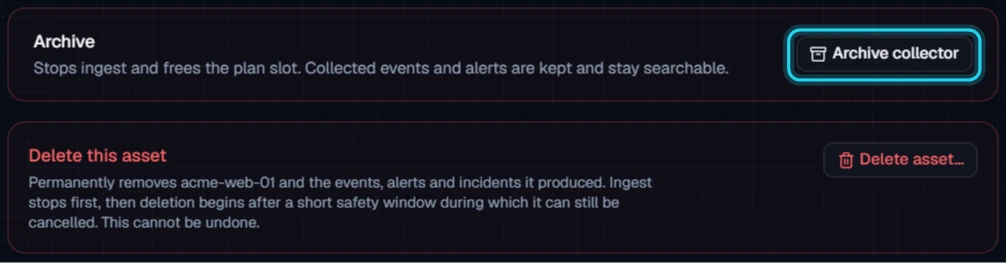
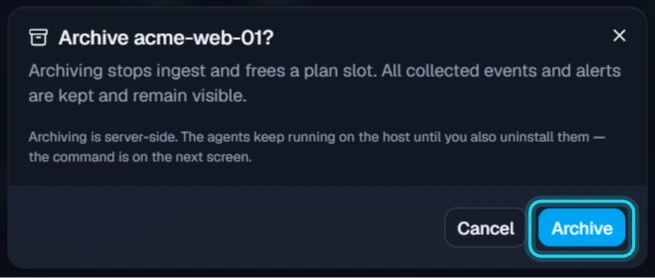
Select Archive to confirm. Archiving stops ingest and frees the plan slot, and the token stops being accepted. Events and alerts already collected stay searchable.
Step 2 - Copy the uninstall command
The Collector archived dialog shows the command that removes the agent from the host. Select the Linux tab, then select Copy.
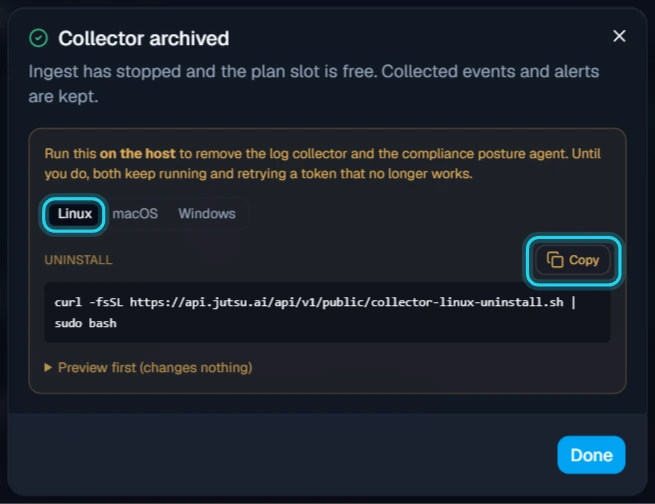
To check what it would remove first, expand Preview first (changes nothing) and run that version instead. It lists every item and changes nothing.
Step 3 - Run it on the host
Paste the command into a shell on the host and press Enter. sudo may ask for your password.
The uninstaller stops and disables the vector service and deletes its systemd drop-in, /etc/vector, and the disk buffer in /var/lib/vector. It removes the host identity timer and /opt/jutsu. Then it stops osquery and deletes /etc/osquery and /var/osquery.
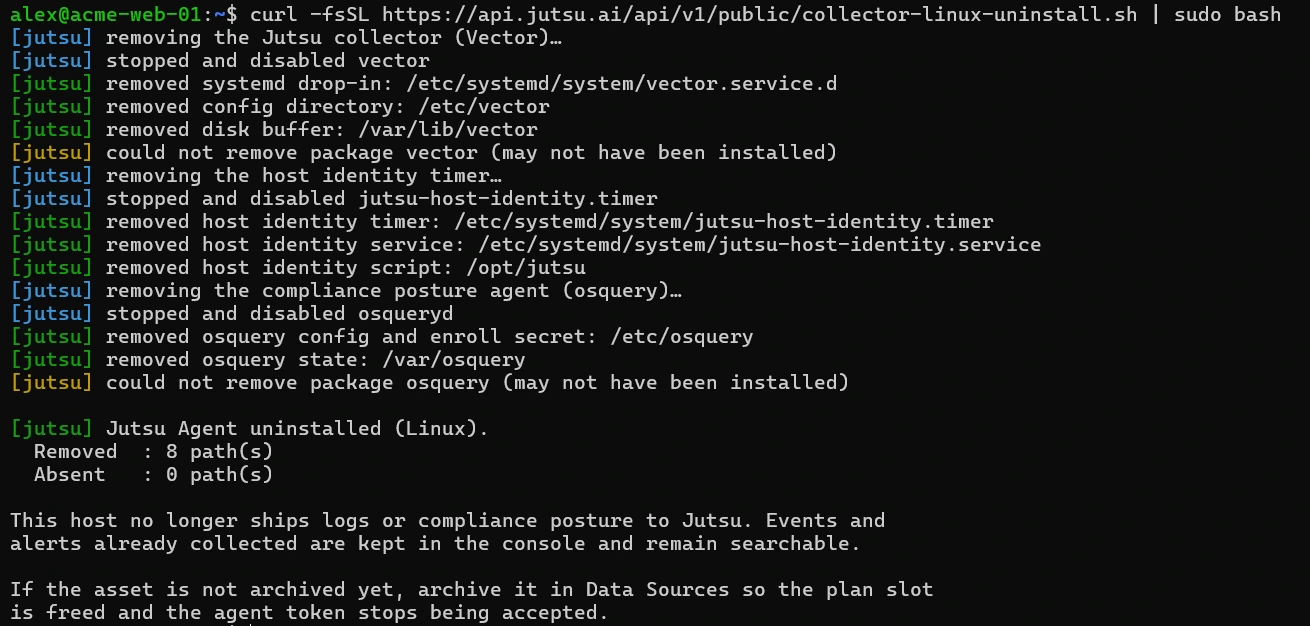
Keep osquery? If osquery was on the host before Jutsu, or another tool uses it, end the command with sudo bash -s -- --keep-osquery instead of sudo bash. It un-enrolls osquery from Jutsu but leaves it installed.
Step 4 - Remove the packages (Debian and Ubuntu)
On Debian and Ubuntu the uninstaller can't remove the vector and osquery packages yet, because the installer holds them at their pinned versions. It reports could not remove package vector (may not have been installed), and the same for osquery, even though both are still installed. The services are already stopped and their configuration is gone.
Release the holds, remove both packages, and delete the agent's last settings file:
sudo apt-mark unhold vector osquery
sudo apt-get purge -y vector osquery
sudo rm -rf /etc/jutsu
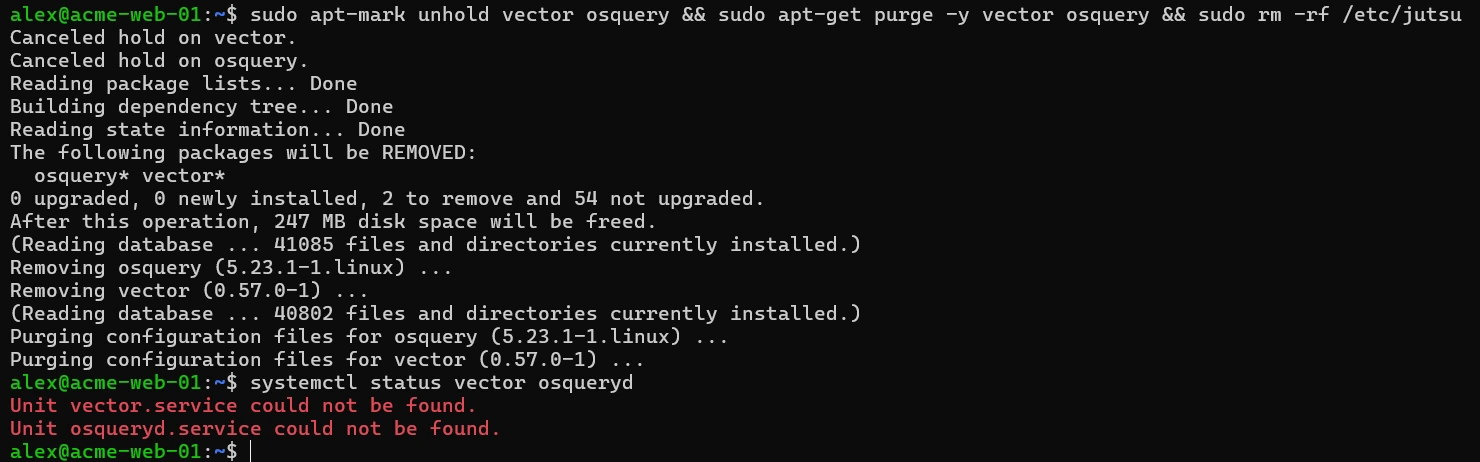
To check, run systemctl status vector osqueryd. It should report that neither unit can be found. The installer also added Vector's package repository, /etc/apt/sources.list.d/vector.list. Delete that file too if nothing else on the host uses Vector.
On RHEL, Fedora, and their rebuilds, check with rpm -q vector osquery whether either package is still installed. Remove any that is with sudo dnf remove vector osquery (or yum on older releases), then run sudo rm -rf /etc/jutsu.
Changed your mind? Archived collectors are listed under Connections → Archived connections, where you can Restore one. You can also select Unarchive on its page. If you already removed the agent, run the install command again.