Solutions/Cybersecurity for startups

Cybersecurity for startups, without building a security team.

Jutsu monitors the systems a startup runs on, uses AI agents to triage and investigate alerts, and asks your team to approve the response. Each source connects in about 10 minutes or less.

Connect a source in about 10 minutesFree plan, no credit cardApproval-based response
Start free
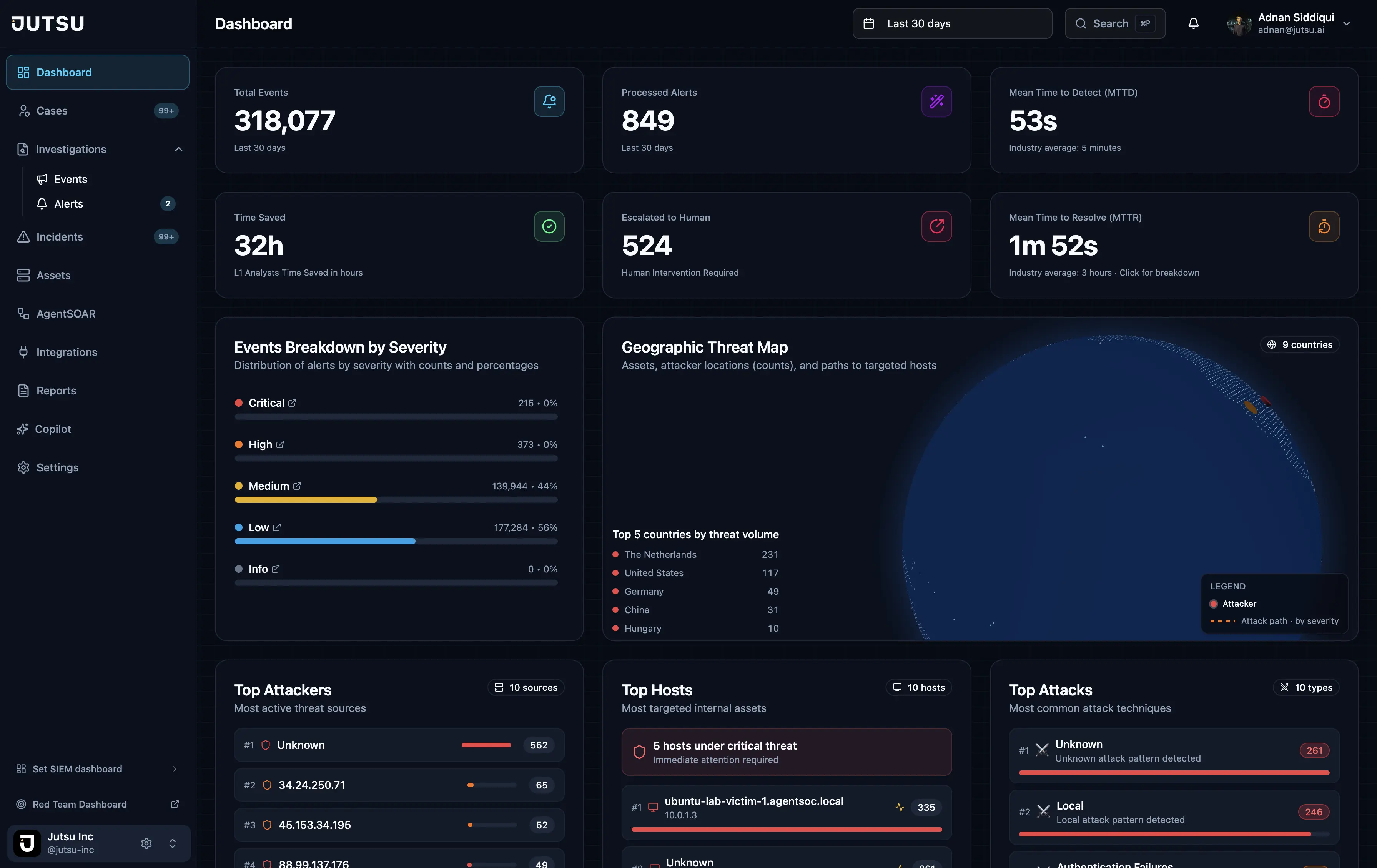
Jutsu · SOC overview
Jutsu dashboard
Cloud, identity, code, endpoints
Google Cloud, Google Workspace, GitHub, and Windows hosts, plus Cloudflare, Vercel, and Railway.
Triage by AI agents
Each alert gets a category, severity, risk score, and verdict before anyone opens it.
You approve the response
Response runs on your approval or within policies you set, and actions can be reverted.
Evidence as a by-product
The same records support SOC 2 readiness when a customer asks.
Guide

What cybersecurity does a startup need?

Start with where a startup is exposed

A startup's risk sits in a handful of systems: the cloud account that runs the product, the identity provider everyone signs in with, the code host, and the machines people work on. A leaked credential, a risky permission change, a secret pushed to a repository, or a compromised laptop each shows up in one of them.

The practical starting point is visibility. Collect the security events those systems already produce, have something watching them at all hours, and decide who approves a response.

  • Cloud: who changed IAM, which APIs were called, and what happened to resources.
  • Identity: who signed in, and what administrators changed.
  • Code: leaked secrets, vulnerable dependencies, and changes to branch protection or membership.
  • Endpoints: security and system events from the machines your team uses.

What you can connect today

Jutsu monitors the sources you connect, and nothing else. Each connection in the table below has a step-by-step setup guide in the docs.

Alerts from Wazuh and syslog can also be sent in, and custom events can be posted to the Ingest API. Connectors for Splunk, Microsoft Sentinel, CrowdStrike, and Elastic are on the roadmap, not available today.

What happens to an alert

Every event that enters Jutsu passes through the same pipeline, run by AI agents.

  • Triage: each alert gets a category, severity, risk score, and verdict.
  • Enrich: indicators are checked against threat intelligence such as VirusTotal, AbuseIPDB, AlienVault OTX, GreyNoise, MalwareBazaar, Kaspersky OpenTIP, MISP, CISA KEV, and IP-API geolocation.
  • Correlate: related alerts become incidents, including multi-hop attack chains such as lateral movement.
  • Respond: AgentSOAR runs response actions against connected cloud, email, and identity providers.
  • Report: incident reports and SOC activity reports are written for you.

No security team needed to start, and you stay in charge

No dedicated SOC team is required. The agents take the repetitive work: normalizing, enriching, triaging, and correlating alerts. Decisions that need judgment stay with your team. On a small team, the person approving a response can be the CTO or the engineer on call.

  • Escalation: alerts the agents can't resolve with confidence go to a person.
  • Approval-based response: from the Startup plan, a person approves an action before it runs.
  • Policy-guided automation: from the Growth plan, actions your policies allow can run on their own.
  • Audit and revert: every AgentSOAR execution is recorded with its status, and actions such as blocking an IP, isolating a host, or disabling a user can be reverted.

Security work that doubles as SOC 2 evidence

Larger customers ask startups how they monitor and respond to security events, and a SOC 2 audit asks for proof. Jutsu keeps an audit trail of alerts, investigations, and response actions, writes incident and SOC activity reports, and provides SOC 2 evidence exports from the Startup plan.

Where Jutsu fits, and where it doesn't

Jutsu fits a startup that runs on the systems above and wants monitoring, investigation, and response in one place, with pricing it can read before a sales call.

It does not replace the basics every team still has to do: turning on multi-factor authentication, limiting admin access, patching, and keeping backups. It also sees only what you connect to it.

Coverage

What Jutsu monitors today.

Each row is a documented connection with its own setup guide.

SourceAreaWhat Jutsu collectsSetup
Google Cloud PlatformCloudCloud Audit Logs: Admin Activity, System Event, and Policy Denied, plus Data Access where you have turned it on.About 10 minutes, keyless
Google WorkspaceIdentitySign-ins and Admin console changes by default. Drive activity and third-party app grants if you turn them on.About 10 minutes
GitHubCodeSecret scanning, code scanning, and Dependabot alerts, pushes, branch protection and repository changes, and member and team changes.About 5 minutes, read-only app
Windows hostEndpointsSecurity and System event logs, Sysmon events when Sysmon is installed, and osquery for compliance posture.About 10 minutes per host
CloudflareCloudThe account audit log, firewall events for your zones, and Zero Trust Access logins.About 10 minutes, read-only token
VercelCloudThe team activity feed: environment variable reads and writes, deployments, member and role changes, and token creation.About 5 minutes
RailwayCloudThe workspace audit log: shell and exec access into containers, variable and secret changes, deployments, and membership changes.About 2 to 5 minutes
WazuhExisting detectionWazuh alerts, sent by a forwarder on your Wazuh manager.Forwarder install

Visibility is limited to the sources you connect. Splunk, Microsoft Sentinel, CrowdStrike, Elastic, and other SIEM connectors are on the roadmap.

How it works

Three steps, end to end.

1

Connect your first source

Follow the setup guide for Google Cloud, Google Workspace, GitHub, or a Windows host. Most take about 10 minutes.

2

Agents work the alerts

Alerts are triaged, enriched with threat intelligence, and correlated into incidents around the clock.

3

You approve what matters

Confirmed threats run through response under your approval or policy. Uncertain ones go to a person.

Capabilities

What a startup gets with Jutsu.

Cloud audit log monitoring

Google Cloud audit logs for IAM changes, API calls, and resource activity, plus Cloudflare, Vercel, and Railway audit events.

Identity monitoring

Google Workspace sign-ins and Admin console changes, with Drive activity and app grants as options.

GitHub security events

Secret scanning, code scanning, and Dependabot alerts, with repository and membership changes.

Endpoint visibility

Windows Security and System event logs, with Sysmon and osquery when installed.

AI triage and investigation

Every alert gets a category, severity, risk score, and verdict, with threat-intelligence context attached.

Response with an undo

AgentSOAR actions run under approval or policy, are recorded, and can be reverted.

FAQ

Common questions.

Start with the security your startup needs now.

Connect your first source on the Free plan with no credit card, or book a demo.

Start free

Subscribe to our newsletter

Get the latest security tips, product updates, and news delivered to your inbox.