Changelog: What's new in Jutsu

New features, improvements, and fixes in each release, newest first.

Faster console pages and lighter asset lists

The console now loads less code up front, the Assets and Connections lists send far less data, and the alert page starts its summary sooner.

Improved

  • The console loads faster. It now fetches about a quarter less code before the first screen appears, and the Jutsu AI assistant loads when you first open it instead of on every page.
  • Compliance pages load only the area you open. Opening Compliance used to download every area at once.
  • The world map on the dashboard loads when you scroll to it, and only when there are countries to show.
  • The Assets and Connections lists load faster and send much less data. For API monitors, the list no longer includes the full API description file, which the monitor's own page still shows.
  • On an alert's page, the AI summary starts loading as soon as the page opens, instead of after the alert itself has loaded.
  • A tab left alone refreshes less often. After two minutes with no input, its lists refresh once a minute instead of every 15 seconds. Any click, key press or scroll brings back the normal pace, and switching back to the tab still refreshes it.

Fixed

  • A security fix in asset lists.

A way back to the console from the portal, Connect Wazuh without a version choice, and AWS rules on schedule

The employee portal always shows a way back to the console for people who manage a workspace, Connect Wazuh no longer asks which version you run, and AWS CloudTrail detection rules run on schedule again.

Improved

  • Connecting Wazuh no longer asks which version you run. The setup commands in Connect Wazuh now work on Wazuh 4.8 to 4.14 and 5.0, and Jutsu reads your version when it tests the connection. The read-only indexer user they create keeps working after you upgrade from 4.x to 5.0. The commands also give the full password rule that both versions accept.

Fixed

  • The employee portal always shows a way back to the console if you manage a workspace. If you signed in to the portal with an emailed code, Back to the console at the top of the portal, and Open the console in your account menu, now take you to the password sign-in with your email filled in, then on to the console. The emailed code only opens the portal, and before this nothing in the portal led back. If you are an employee in one workspace and an admin in another, the same button switches you to the workspace you manage.
  • Sign in again on a portal page now reaches the password sign-in. When a portal page asked you to sign in again for a workspace you manage, it could land on the emailed-code sign-in instead.
  • AWS CloudTrail detection rules run on schedule again. A release on November 16 made each CloudTrail rule read up to six hours of events on every run, so on busy AWS accounts some rules ran late or timed out. Each run now reads only the events that reached Jutsu since the rule's last run, and an event CloudTrail delivers late is still checked.
  • A security fix in Connect Wazuh.

Wazuh integration, portal links and reminders, and AWS S3 deletion alerts

Connect Wazuh for alerts, inventory, compliance checks and response, send people a personal portal link and reminders, and get alerted when an S3 bucket or many of its objects are deleted.

New

  • Wazuh. Connect a Wazuh manager and its indexer under Integrations, Data Sources. The connect dialog gives you scripts that create read-only users for Jutsu. Once connected, Jutsu:

    • pulls Wazuh alerts into your events and checks them with 16 Wazuh detection rules;
    • lists your Wazuh agents as machines, and their local accounts on the connection's People tab;
    • shows each host's vulnerabilities and failed configuration checks;
    • runs nine compliance checks that feed your compliance tasks;
    • can act on a compromised host or account once you add a response credential: block an IP, disable an account, isolate a host, restart the agent, or rescan for vulnerabilities.

    Works with Wazuh 4.8 to 4.14. Support for Wazuh 5.0 is a release candidate: on 5.0, blocking an IP, disabling an account and isolating a host are not available yet.
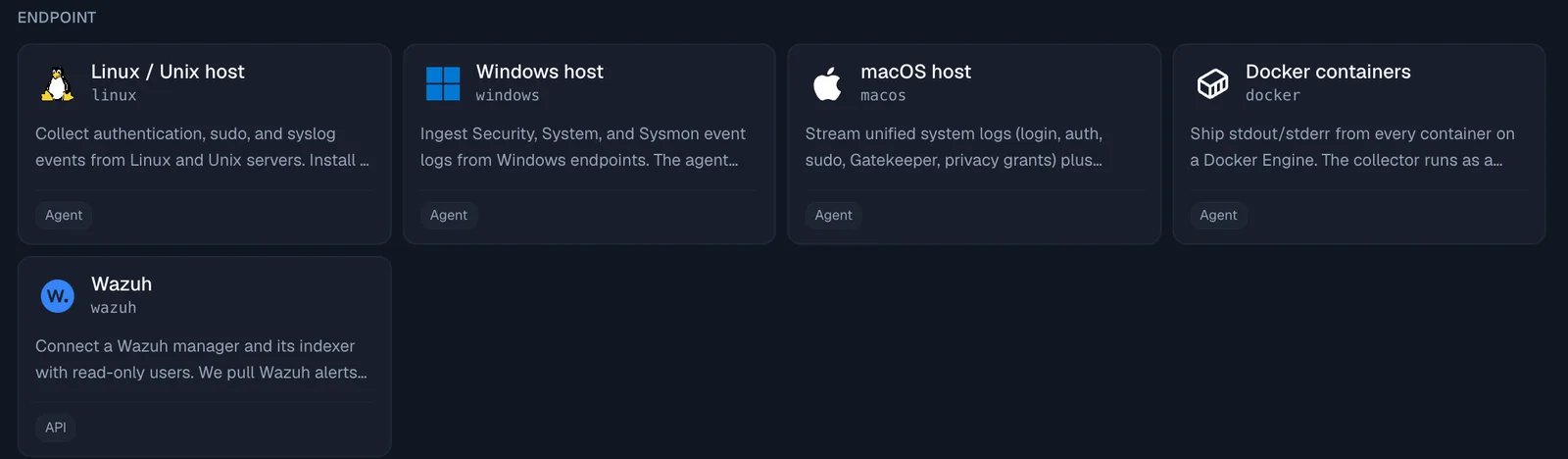
    The Data Sources catalog's Endpoint row: Linux, Windows, macOS and Docker hosts, and the new Wazuh tile

  • AWS S3 deletion alerts. Two new high-severity rules: AWS S3 bucket deleted, and Many AWS S3 objects deleted (100 or more deletes in one bucket within an hour). Their fix steps cover getting objects back from earlier versions and keeping a deleted bucket's name from being taken.

  • A personal portal link for each person. Under Compliance, People, open a person and choose Copy portal link. It suits people who never sign in to the console. Opening the link sends a six-digit code to the person's own email, and the link alone never signs anyone in.

  • Portal reminders. On a person's page, Send reminder emails them what they still have to do. Remind everyone with something to do covers the whole list at once. A weekly reminder goes out on Mondays from 09:00 in your organization's time zone; turn it off under Compliance, Settings, Weekly portal reminders.

  • People you invited who have not joined yet now get policy signing requests, with their personal link.
Improved

  • Compliance tasks in the console. The tasks bar counts every open portal item (policies, training, HIPAA and computer checks) and has an Open your portal button. The user menu has a new My compliance tasks item with the same count.
  • A To do list on each person's page under Compliance, People. It names every open item and matches what the person sees in their portal.
  • Evidence approvals are easier to follow. Each evidence task shows its owner and its approver. A task whose problem has cleared is tagged Ready to send for approval, and the list counts them; click the count to see only those. The task page names the approver under Send for approval.
  • AWS CloudTrail rules no longer miss late events. Every CloudTrail rule now reads events by when they reach Jutsu, so an event CloudTrail delivers several minutes late is still checked.
  • Jutsu MCP server. A link from another organization now gets a reply with the setup link for that organization's MCP connection.

Fixed

  • The portal no longer leaves you stuck once everything is done. Back to the console sits in the header, on the all-done page and on the training's You passed step, and it returns you to the console page you came from. People without console access are told they can close the page.
  • Portal errors now say what went wrong. Signed in to the wrong organization offers Sign in again, and other errors show a code and a time you can send to support.
  • Evidence that was sent for approval automatically now shows the Approve and Send back buttons.

Docs

  • Each section of the docs sidebar now has its own page listing its guides.

Fix with your AI agent, fix briefs over MCP, and rewritten fix steps

Fix pages now open your AI agent with the finding loaded, the Jutsu MCP server turns a pasted link into a fix brief, and every fix step in Jutsu is shorter, linked to the right page, and ends with a way to confirm it worked.

New

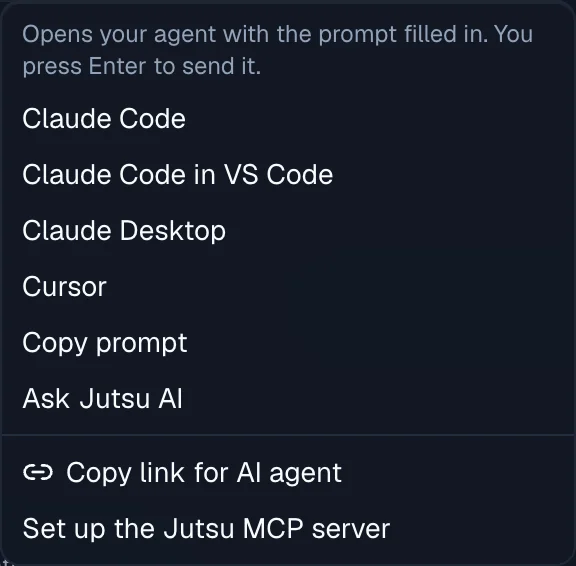
  • Fix with your AI agent. Cloud findings, risks, alerts and code security findings have a new button. It opens Claude Code (in the terminal or in VS Code), Claude Desktop or Cursor with a prompt that links to the finding. Nothing is sent until you press Enter. The same menu has Copy prompt, Ask Jutsu AI, Copy link for AI agent, and Set up the Jutsu MCP server.

    The Fix with your AI agent menu: Claude Code, Claude Code in VS Code, Claude Desktop, Cursor, Copy prompt and Ask Jutsu AI, then Copy link for AI agent and Set up the Jutsu MCP server

  • Paste a Jutsu link into your AI agent. The Jutsu MCP server's new open_link tool reads a link to a cloud finding, risk, alert, incident, code security finding or connection. For a cloud finding it returns a fix brief:

    • the exact account, project or subscription and region the fix applies to;
    • the commands to run, the command that confirms the fix, and the permissions it needs;
    • how the agent checks that your local command line is signed in to that same account before it changes anything.

    In Claude Code, /mcp__jutsu__fix_finding walks through it step by step, and recheck_cloud_finding asks Jutsu to check the finding again once it is fixed. A link from another organization gets a clear answer naming the organization the agent is connected to.

  • Live dictation in Jutsu AI. Speak into the Jutsu AI chat box and the words appear as you talk. Available for organizations that use Gemini.

Improved

  • Fix steps, rewritten across Jutsu:

    • every cloud and SaaS check, server hardening check, alert, risk and code security finding;
    • each step leads with the action and links to the page where it happens, down to the exact resource in AWS, Google Cloud or Azure when Jutsu knows it;
    • each fix adds the provider's own docs, a command to confirm it worked, a caution when a change can break something, and the permissions it needs.

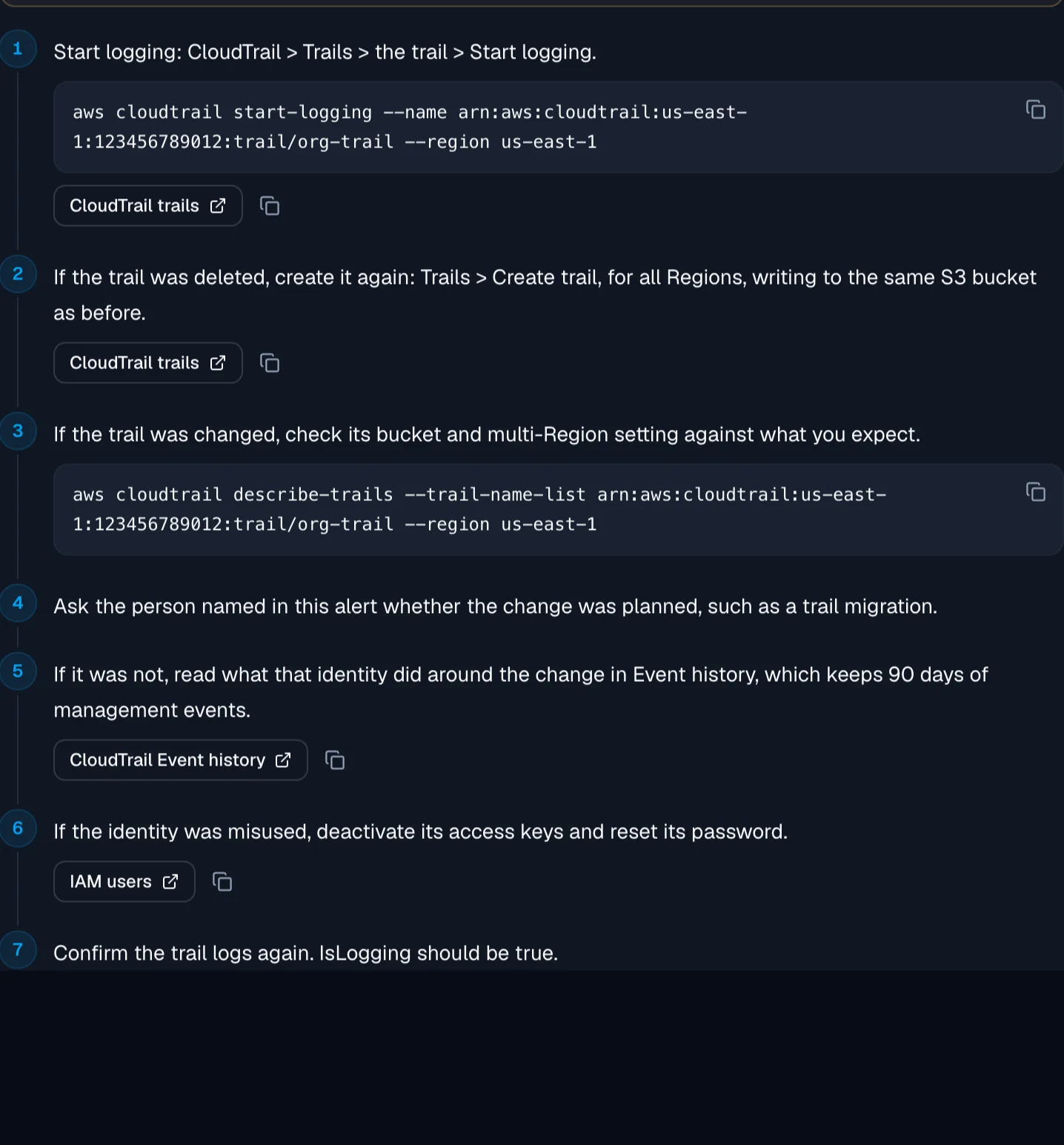
    An alert's How to fix it steps: a caution to read first, numbered steps with the trail already filled into each command, links to the CloudTrail pages, and the Fix with your AI agent button

  • Commands use your real names in more places. Alert fix steps fill in the trail, user, repository or project from the alert itself. Risk summaries, device checks and the posture report use the resource's own names. A value Jutsu cannot know becomes a box you fill in, and Copy waits until every value is valid.

  • The posture report shows commands as code, on screen and in the PDF.

  • Remediation and false-positive guidance is rewritten for 120 built-in detection rules, to match their fix steps.

Fixed

  • Fix steps that were wrong or risky are corrected. Two examples:
    • turning on VPC flow logs now warns that AWS replaces the bucket's policy;
    • a domain controller's SYSVOL and NETLOGON shares are no longer reported as extra shares to remove.
  • Jutsu AI: the first message of a new chat stays on screen.

Alerts that close themselves, a compliance to-do in the Action Center, and fix steps that name your resource

Jutsu now closes the alerts it can settle on its own and says why, the Action Center lists your compliance to-do and folds one check's risks into one row, and fix steps name the exact resource with a link to it in your cloud console.

New

  • Jutsu now closes the alerts it can settle by itself, and each closed alert says why:

    • An attack attempt where nothing got through closes as Resolved. If a later check finds that it did succeed, the alert reopens and notifies you.
    • A vulnerability alert from Jutsu's dependency scan or Dependabot closes once its finding is in Code Security, which tracks it until it is fixed or dismissed.
    • An AI review closes alerts it judges are not a real security issue, inside limits Jutsu enforces. It never closes a critical alert, and never one about account takeover, secrets, cleared logs, admin grants, defense evasion, execution, impact or data exfiltration.

    Nothing a person set or answered on an alert is changed.

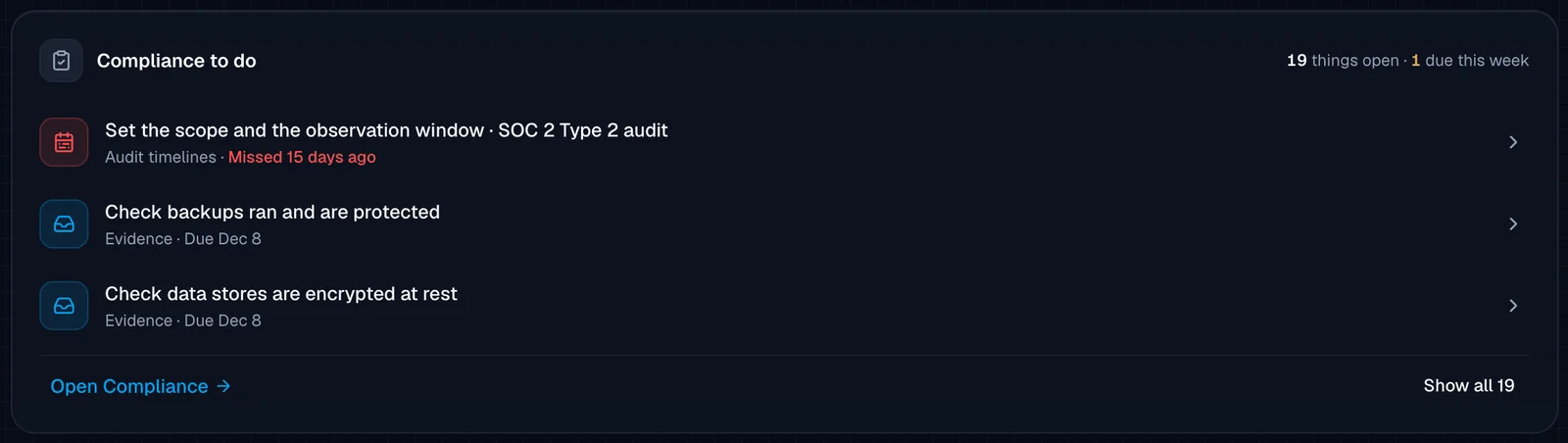
  • Action Center: "Compliance to do" now sits under Needs you. It shows the next three compliance tasks (policy approvals, evidence and documents due, vendor and risk reviews, audit findings and audit timelines), how many are open and how many are due this week. "Show all" opens the full list in place.

    The Action Center's Compliance to do section: 19 things open and 1 due this week, listing "Set the scope and the observation window" for a SOC 2 Type 2 audit, missed 15 days ago, and two evidence tasks due Dec 8, with Open Compliance and Show all 19 links

  • Fix steps on a cloud finding and on its risk now use the real resource name, such as the bucket or the user, instead of a placeholder. The finding page links the resource and adds a button such as "Open the bucket in AWS" (Google Cloud and Azure resources get the same), and the risk page puts that link on the first fix step.

Improved

  • Action Center: risks from one failing check on one connection now fold into a single row under Needs you, named the way the Risks list names the group, for example "Public access is allowed on 10 storage buckets". Open takes you to that group on the Risks page, and the arrow expands the row to show each risk.
  • Risks from Google Workspace, GitHub and AWS account checks now name the account (an email, a GitHub @login or an AWS user name) instead of an internal ID, and open with what is wrong with that account. Google Workspace 2-step verification risks link to the account's page in Google Admin.
  • A link to a risk, alert or incident now opens in the organization that holds it, even when you are working in another one.
  • The connection type chart at the top of the Risks page can be collapsed.
  • The AI agents page in Organization settings is now called MCP, and so is the screen where you approve an MCP client.
  • Jutsu AI knows about recent console changes, including monitors, the Azure, Supabase and Render connections, and alerts that close themselves.

Fixed

  • Employee portal: the link in a policy email now opens the portal for that email's organization, for people who belong to more than one. Someone without a seat in the organization is told so, instead of "Something went wrong on our side."

Docs

  • Weekly release notes: a longer roundup of each week's releases, at /release-notes.

Detection rules that see their events, three new AWS rules, and idle rules that say why

Many Windows, AWS, GCP, Cloudflare, Vercel and sign-in rules now see the events they need at the default severity setting, there are three new AWS rules, and the Rules page tells you which idle rules need attention.

New

  • Three AWS CloudTrail rules: Assume-role trust policy widened, VPC Flow Logs disabled, and Secrets Manager secret accessed. The Secrets Manager rule alerts on secrets read by a person rather than an application, and it is off by default; turn it on under Rules.

  • The Windows collector installer now turns on the Windows audit settings that Jutsu's Windows rules read: process creation with command lines, scheduled tasks, account and group changes, audit policy changes and logons. It prints every setting it changes, and -SkipAuditPolicy leaves the host's audit policy alone. Re-run the installer on hosts that already have the collector to apply the settings.

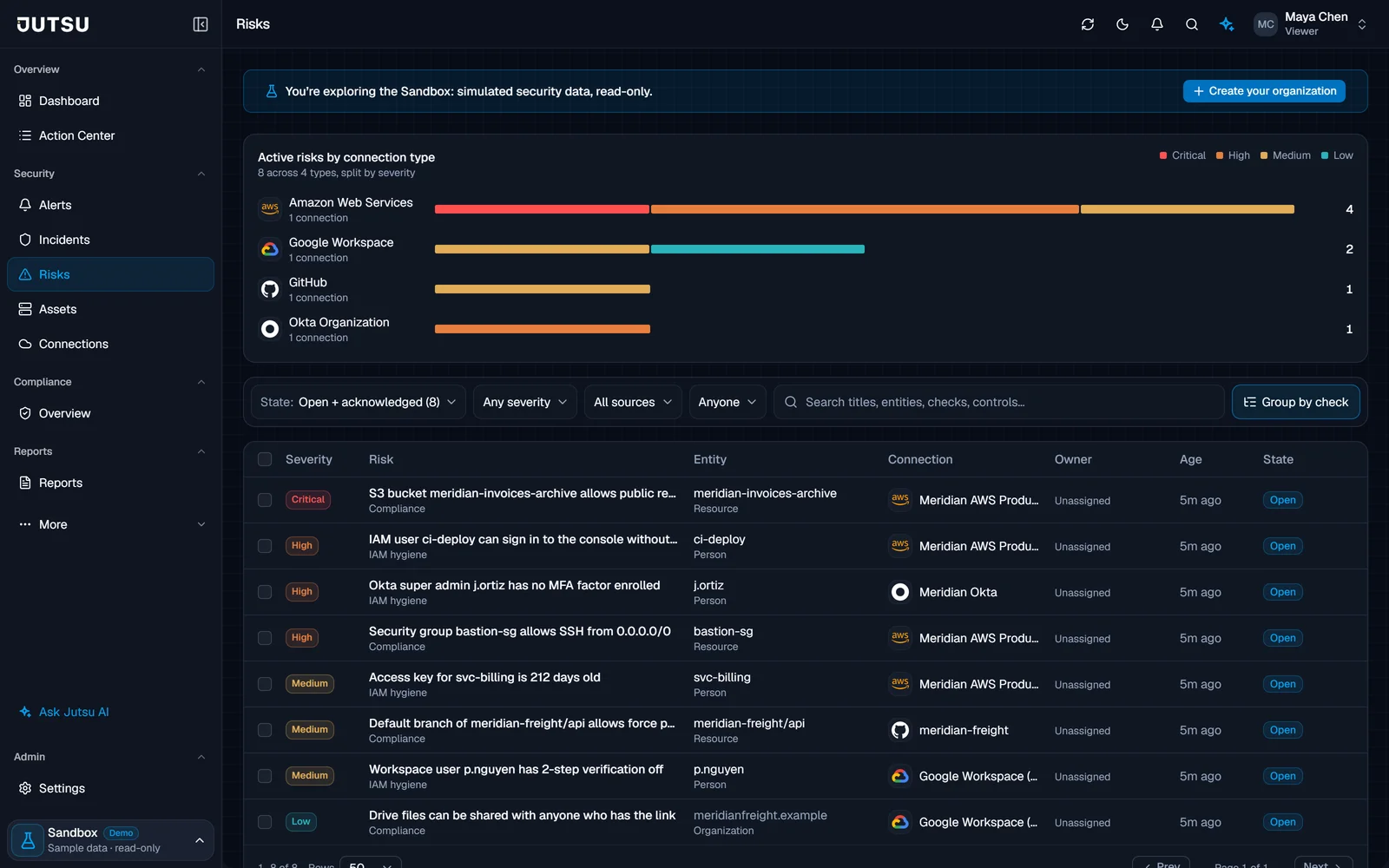
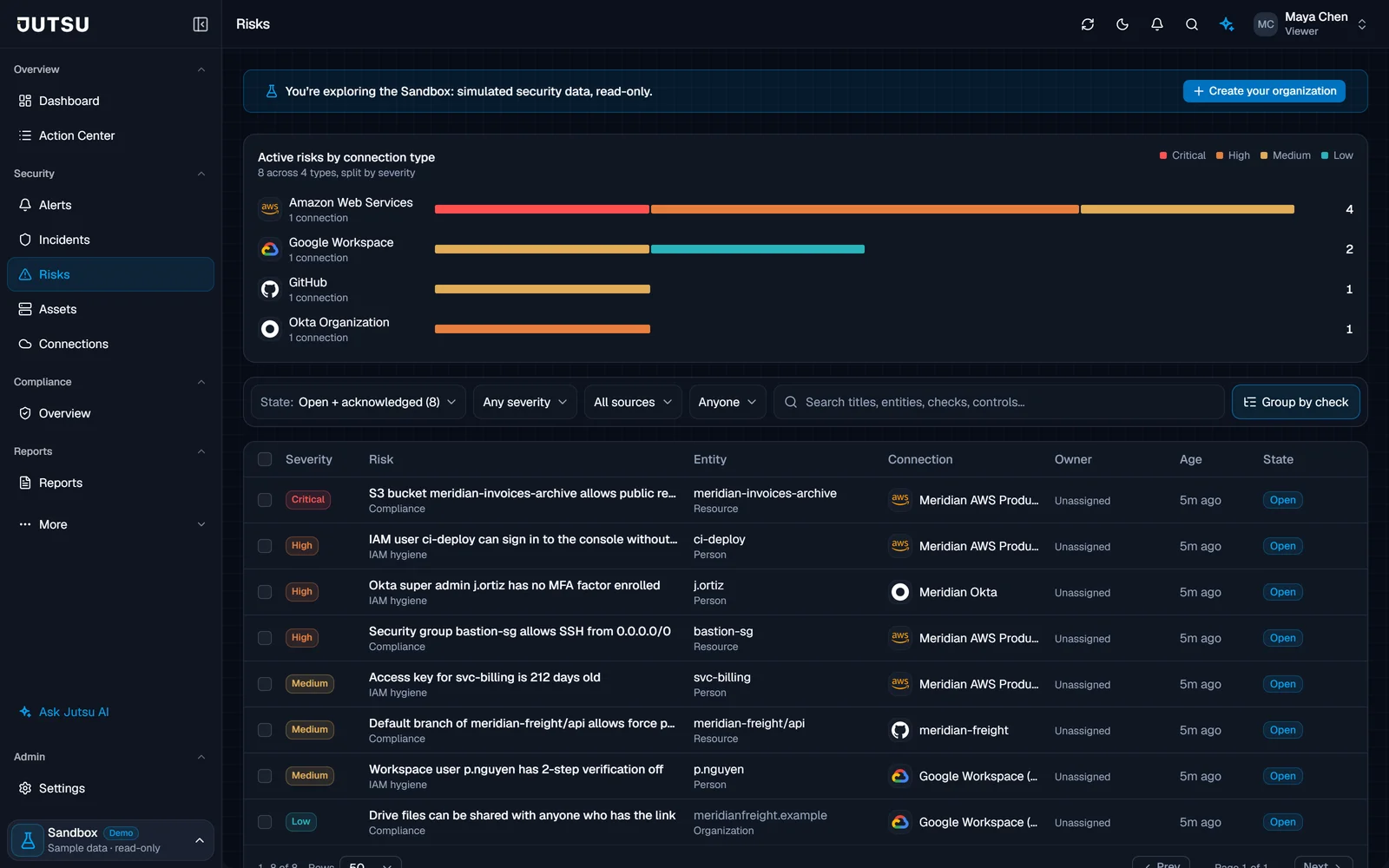
  • Risks: filter the list by connection type. A chart of risks by connection type and severity replaces the tiles at the top of the Risks page.

    The Risks page with the Active risks by connection type chart: Amazon Web Services, Google Workspace, GitHub and Okta Organization, each bar split by severity, above the list of open risks

Improved

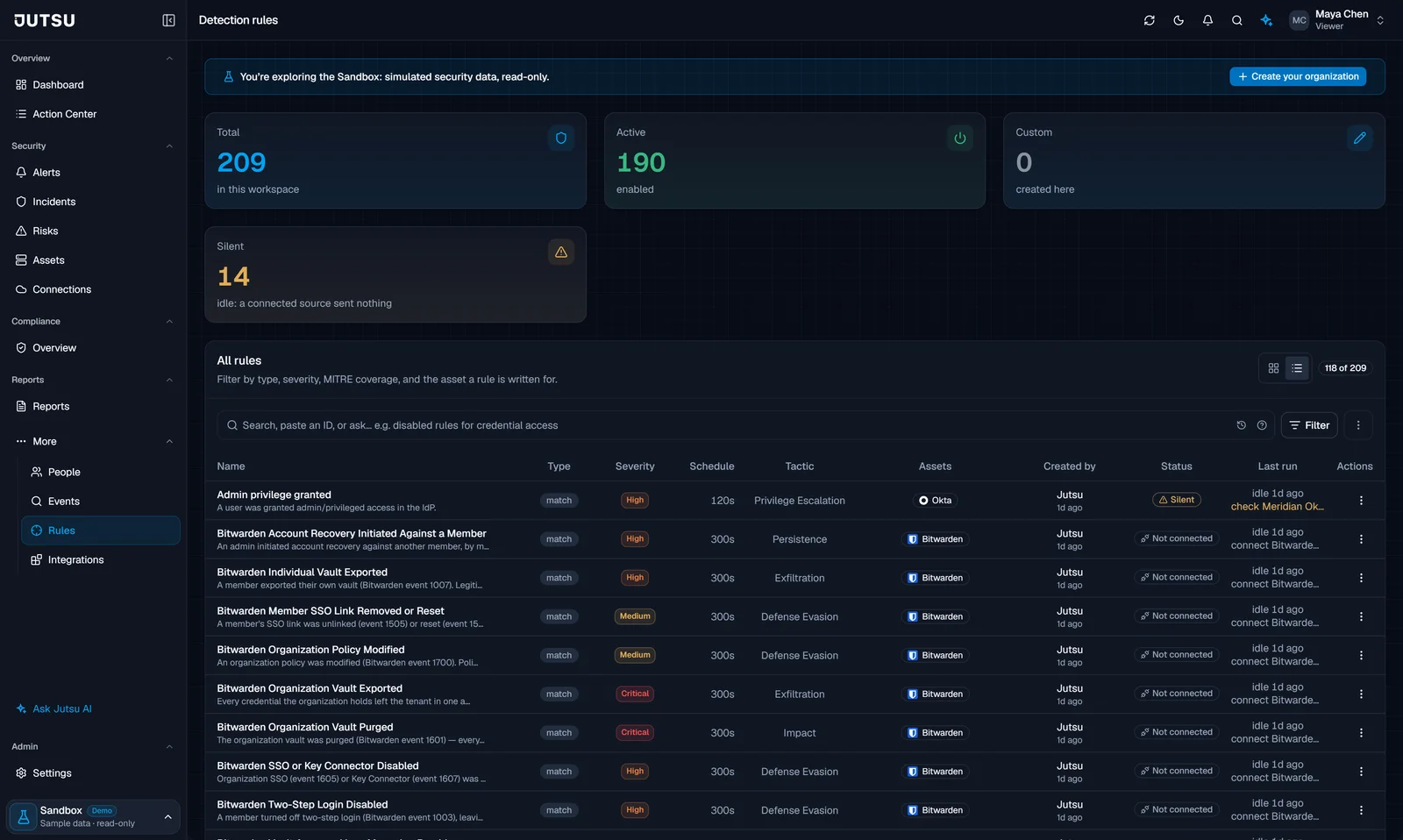
  • Rules: an idle rule now says why it is idle. "Silent" means a source you connected sent nothing in the last 24 hours, with a link to that connection. "Not connected" means you have not connected that source; those rules are folded away by default, and the State filter can show them.

    The Rules page filtered to idle rules: an Okta rule marked Silent with a link to check the Meridian Okta connection, and Bitwarden rules marked Not connected with a link to connect Bitwarden

  • Pipeline Health and the dashboard's ingestion card now judge a source by when its events arrive, and show how many of them were stored for rules. A source whose events all fall below its Minimum severity no longer shows as down.

  • AWS connections: when GuardDuty or Security Hub is not turned on in the AWS account, the connection page says so in a neutral note with links to turn them on, instead of a "Needs attention" warning.

Fixed

  • Detection rules that could not fire at the default Medium severity setting now see their events:
    • AWS CloudTrail: Security group opened to the world, S3 bucket made public, GuardDuty disabled, AWS Config recorder stopped, KMS key disabled or scheduled for deletion, EBS snapshot shared externally, IAM login profile created, IAM policy modification, and Account password policy weakened.
    • Command-line rules on Windows, Linux and macOS: Suspicious PowerShell execution, LOLBin remote download, Credential dumping (LSASS), Endpoint security tooling tampering, Shadow copy / backup deletion and Linux reverse shell. Sysmon process events now feed them too.
    • Sign-in rules (Failed logins followed by success, Impossible travel, Anomalous login behavior) now see successful sign-ins from Okta, Microsoft 365, Cloudflare Access, 1Password, Bitwarden and LastPass.
    • Cloudflare: log delivery changes, rate-limit rule changes, Access application, group and identity provider changes, Worker and route deployments, bulk DNS changes, and Access granted after repeated denials.
    • Vercel: actions from the audit log drain are graded the same as the activity feed, and a secret file served to a probe is detected.
    • Okta MFA push denials, Bitwarden secrets read from the CLI, Docker container log rules, and web attack signatures in URLs from Cloudflare, Railway, Supabase and webhook sources.
  • GCP: "privileged role granted", "firewall rule opened to the internet" and "long-lived credential created" now match Google's real audit log records.
  • "S3 bucket made public" now also catches a bucket policy that allows everyone and Block Public Access being removed.
  • "Security group opened to the world" no longer matches private address ranges such as 10.0.0.0/8.
  • Routine commands no longer look like attacks: sc query windefend, rsync -e ssh and PowerShell's -Encoding argument.
  • "RDP brute force" now explains that hosts with Network Level Authentication log failed RDP logons as a different logon type, which "Windows account brute force" covers.
  • Rules: Viewers, and anyone exploring the Sandbox, no longer see "Forbidden" over a rules table that loaded fine.
  • Jutsu AI: a complete answer is no longer marked "The response stopped before it finished.", and a chat started near the end of a sign-in session no longer loses its data lookups partway through.

Group owners on Risks, a Needs you count that opens its list, and faster Supabase change tracking

Giving a group of risks an owner now assigns every risk in it, the dashboard's Needs you count opens the list it counts, and Supabase setting changes reach the change feed within minutes.

Improved

  • Giving a group an owner on the Risks page (Group by check) now assigns every risk in the group, however large, and its risks show the new owner right away. The new owner gets one message for the whole group, and unassigning a group clears it from all of them.
  • The dashboard's "N things need you" now opens the Needs you list on the Action Center, which shows exactly what it counts: approvals and targets waiting on you, and open risks and incidents nobody owns.
  • Risks stays visible when Incidents is switched off for your organization. Each now has its own switch.
  • Supabase setting changes (API keys, Auth settings, SSL enforcement and network restrictions) now reach the Organization change feed within minutes, at the next poll. They used to take up to an hour, and a change made and undone within that hour never showed.
  • The source switches on a Supabase connection now say what each source needs and what it can see. For example, role grants reach the Postgres log only when pgAudit logs the ROLE class.

Fixed

  • The notification bell now says when your notifications could not load, instead of "You're all caught up".

Microsoft Azure on par with AWS, and an MCP server for your AI agents

Azure connections now bring in events, detections, assets, compliance checks and response actions, and AI agents such as Claude, Cursor and VS Code can connect to Jutsu through its MCP server.

New

  • Microsoft Azure connections now do what AWS connections do. Until now an Azure connection signed in and checked its roles, and read nothing else.

    • Events. Jutsu reads each subscription's Activity Log and the alerts from Microsoft Defender for Cloud.
    • Detection. 19 built-in Azure detection rules, each with fix steps.
    • Assets. Your Azure resources (12 kinds, among them storage accounts, network security groups, key vaults, SQL servers and web apps), the people and service principals that hold Azure roles, and your virtual machines as machines. A collector installed on an Azure VM links to that VM.
    • Compliance. 35 CIS-based Azure checks. Defender for Cloud recommendations show up as findings, Jutsu collects Azure evidence for your controls, and the cloud account security report covers Azure.
    • Response. With a separate Jutsu Response app that you approve in your tenant, Jutsu can block an IP address with a network security group rule, isolate a VM, disable an Entra ID user and sign them out everywhere. On storage accounts it can turn off public blob access, require HTTPS and set the minimum TLS version to 1.2.
    • On the connection page. A daily health check, a minimum severity, pause and resume, a choice of which data to bring in, and a cleanup step when you archive or delete the connection.
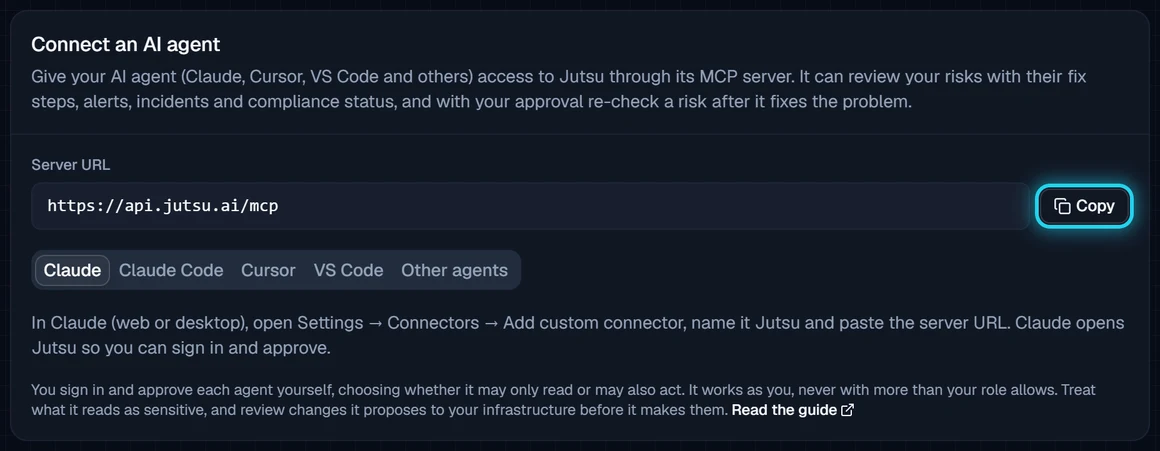
  • Connect your own AI agent to Jutsu. Claude, Claude Code, Cursor, VS Code and other MCP clients can now connect to the Jutsu MCP server. Your agent can read your risks with their fix steps, alerts, incidents, events, assets and compliance status. If you let it act, it can also re-check a risk after fixing it, update a risk, change an alert's status and comment on an incident. You sign in and approve each agent yourself, and it never gets more access than your role. Set it up under Organization, then AI agents, where you can also see and disconnect connected agents.

    The AI agents page under Organization, with the server URL and setup steps for Claude, Claude Code, Cursor and VS Code

Improved

  • Jutsu no longer has organization API keys or the API keys page. AI agents connect through the MCP server instead, signed in as you. Collector tokens work as before.

Docs

  • New guide: Jutsu MCP server, with the steps for Claude, Claude Code, Cursor and VS Code.
  • The Jutsu API page explains what replaces organization API keys, and what a host's own collector token can still do.

Risk headline numbers, assignment notices, and an Azure walkthrough video

The Risks page opens with headline numbers and a breakdown by connection type, and assigning a risk now tells its new owner.

New

  • The Risks page now opens with four headline numbers: active risks (with how many are new this week and how many have been open for over 30 days), critical (with the high count beside it), unassigned (with how many are assigned to you), and resolved in the last 30 days (with the average time to resolve). Click Critical, Unassigned or Resolved in 30 days to filter the list below.
  • Beside them, Active risks by connection type shows where your open and acknowledged risks come from: one bar per connection type, split by severity, largest first.
  • Assigning a risk now notifies its new owner by email and in the console. It is on by default, and you can change it under Risks in your notification settings. Assigning several risks at once sends one message for the batch.

Improved

  • On the Risks list, every title starts in the same place, and the risks inside an expanded group sit one step in from the group's own title.

Docs

Subscribe to our newsletter

Get the latest security tips, product updates, and news delivered to your inbox.