Security monitoring for startups: what to log and alert on first

For founders and the first engineer who owns security. Start with the systems you already run, such as AWS, Google Workspace, GitHub, and Vercel, and the few events in each that signal a real problem. Jutsu watches them 24/7, has AI check every alert, and asks your team before it blocks or disables anything.

Start free
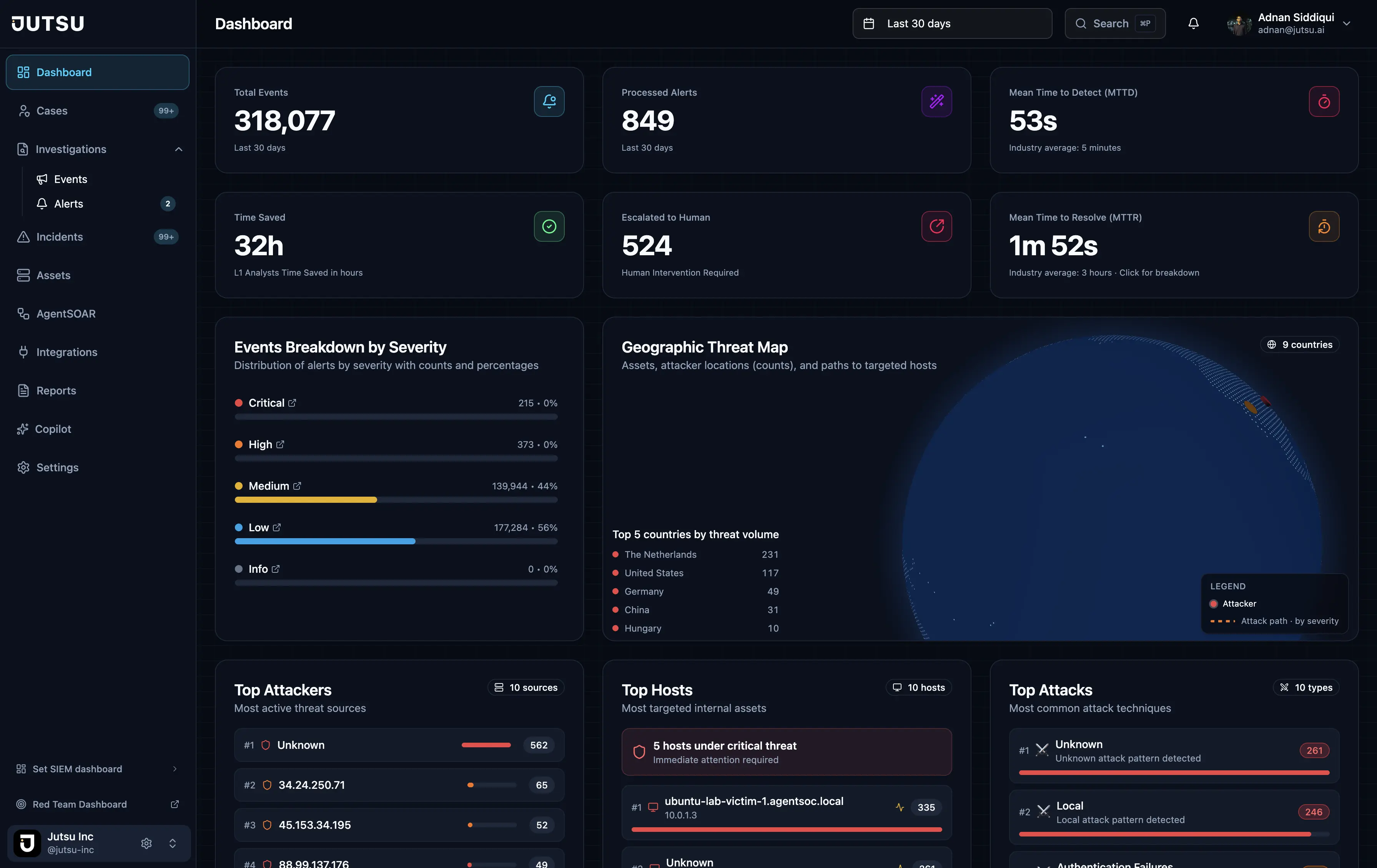
Jutsu dashboard
Jutsu · SOC overview
  • Your systems, by nameAWS, Azure, Google Workspace, GitHub, Vercel, Supabase, Cloudflare, Railway, and the laptops your team uses.
  • Awake at 3 a.m.Events are watched around the clock, and AI takes the first look at every alert.
  • You make the callOn the Startup plan, nothing is blocked or disabled until someone on your team says yes.
  • Start at $0The Free plan watches 5 assets from 1 data source, with no credit card.

What should a startup monitor first?

Start with the systems an attacker would use

A stolen sign-in, a leaked key, and a setting changed in a hurry are the usual ways into a startup. Each one leaves a trace in a system you already run, and those systems already keep the logs. Security monitoring means collecting those logs, watching them at all hours, and acting on the few events that matter.

  • Google Workspace or Microsoft 365: who signed in, from where, and what admins changed.
  • AWS, Google Cloud, or Azure: who changed permissions, opened the network, or made storage public.
  • GitHub: leaked secrets, repositories made public, and branch protection removed.
  • Vercel, Supabase, Railway, and Cloudflare: who read or changed secrets, who joined, and what was opened to the internet.
  • Laptops and servers: new admin accounts, suspicious commands, and SSH sign-ins.

What to log first

Turn on the audit logs your providers already keep, then keep them somewhere longer than the provider does. Some keep very little: Supabase keeps logs for 1 day on its Free plan, and Railway keeps audit logs for 48 hours on its Free, Trial, and Hobby plans, according to Jutsu's Supabase guide and Railway guide.

For a typical SaaS startup, this order covers the most risk for the least work:

  • The place everyone signs in: Google Workspace or Microsoft 365.
  • The cloud account that runs the product: AWS CloudTrail, Google Cloud audit logs, or the Azure Activity Log.
  • The code: GitHub's audit events and its secret scanning, code scanning, and Dependabot alerts.
  • Where you deploy and store data: Vercel, Supabase, Railway, and Cloudflare.
  • The laptops and servers your team uses.

What to alert on, and what to leave as logs

Alert on the events that need a person today. Keep everything else as logs, for search and for your audit. The table below gives one example per system; these are the kinds of events worth waking someone for.

Routine events, such as a normal sign-in or a redeploy, stay out of the alert queue. In Jutsu, new connections start with a Medium-and-above severity floor: lower events are kept for search but don't raise alerts. When a source goes quiet, the rules that read it say so, and Pipeline Health shows when each source last sent events.

  • A sign-in after many failures, or from two places too far apart to travel between.
  • 2-Step Verification turned off, or a new super admin.
  • A live credential found by GitHub secret scanning, or a private repository made public.
  • A security group opened to the world, or an S3 bucket made public.
  • A Supabase database opened to the whole internet, or MFA turned off for a member.

24/7 security monitoring without a security team

Logs nobody reads don't protect you. The hard part is the review: deciding at 3 a.m. whether a sign-in from a new country is your CTO on a trip or someone using their password. Jutsu's AI agents take that first look.

  • Each alert gets a category, severity, risk score, and verdict.
  • IP addresses, domains, and file hashes are looked up in threat intelligence feeds.
  • Related alerts become one incident, so you read one story instead of ten alerts.
  • When the AI isn't sure, it asks a person instead of acting.
  • When an alert is real, Jutsu proposes the fix, such as blocking an IP or disabling a user. On the Startup plan a person approves it first, and every action can be undone.

Software, not a team you rent

Jutsu is software with AI agents. Nobody at Jutsu watches your alerts, so someone on your team still owns the decisions and approves responses. If you want people on call for you at night, a managed detection and response (MDR) service is the other route. SIEM for startups compares the options, with their published prices.

What it costs

The Free plan costs $0 with no credit card. It covers 5 assets and 50 AI investigations a month, with limited AI triage. It connects 1 data source, so start with the one everyone signs in through. The Startup plan connects 8 and the Growth plan 20.

Paid plans are published and billed monthly or annually: Free ($0/month), Startup ($149/month), Growth ($499/month), Enterprise (custom quote). See the pricing page for what each includes.

Where this stops

Jutsu sees only what you connect. It doesn't scan your code or dependencies itself (GitHub's own alerts flow in), and it doesn't cover prompt injection or other risks in the AI models your product uses: for those, start with the OWASP Top 10 for LLM applications. Monitoring also doesn't replace the basics: multi-factor authentication everywhere, few admins, patching, and backups.

What to log and alert on, by source

The events worth watching in each system, an example alert, and how long the connection takes in Jutsu.

SourceEvents to watchExample alertSetup in Jutsu
AWS CloudTrailAPI calls, console sign-ins, and changes to IAM, networks, and storage, from the trails you choose.Security group opened to the world, S3 bucket made public, or GuardDuty disabled.A CloudFormation stack, no access keys. The first log file can take about 15 minutes.
Google WorkspaceSign-ins and Admin console changes, plus Drive activity and third-party app grants if you turn them on.A suspicious sign-in, an admin privilege granted, or 2-Step Verification turned off.About 10 minutes, with a super administrator.
GitHubSecret scanning, code scanning, and Dependabot alerts, pushes, branch protection, and member changes.A live credential found by secret scanning, a private repository made public, or a force push to the default branch.About 5 minutes, read-only app.
VercelEnvironment variable reads and writes, deployments, member and role changes, tokens, and firewall changes.Deployment Protection turned off for a project, or a credential file such as .env served to a scanner.About 5 minutes, team access token.
SupabaseAuth sign-ins and failures, failed database logins, and changes to members, MFA, API keys, SSL, and network restrictions.A member raised to Owner or MFA turned off, or a database opened to the whole internet.About 5 minutes, read-only token.
CloudflareThe account audit log (DNS, WAF, API token, and member changes), firewall events, and Zero Trust Access logins.Failed Access logins followed by a success, or a WAF rule turned off.About 10 minutes, read-only token.
RailwayShell, exec, file, and tunnel access into containers, variable and secret changes, deployments, and members.A shell opened into a production container, or a secret changed outside a deploy.About 2 minutes with Connect with Railway, or 5 with a token.
Laptops and servers: macOS, Windows, LinuxProcesses and their command lines, new accounts and admin group changes, SSH sign-ins, and sudo.Account created and granted admin, suspicious PowerShell, or a Linux reverse shell.About 10 minutes per host, or one install command per Mac.
Microsoft AzureEach subscription's Activity Log, and the alerts from Microsoft Defender for Cloud.Someone given Owner on a subscription, a storage account opened to public blob access, or a high-severity Defender for Cloud alert.About 10 minutes: an app registration with read-only roles.

Example alerts are events worth a person's attention. Many are built-in Jutsu rules, such as Security group opened to the world and Account created and granted admin, and the Rules page in Jutsu lists every rule for each source. Setup times come from the setup guides. Google Cloud, Microsoft 365, Docker containers, Wazuh, and webhooks connect too.

Three steps, end to end

  1. Connect where everyone signs in

    Start with Google Workspace, then add AWS, GitHub, and the platforms you deploy on. Most take about 10 minutes.

  2. AI checks every alert

    Each alert gets a verdict and threat-intelligence context, and related alerts become one incident.

  3. Your team makes the call

    Jutsu proposes the fix, such as blocking an IP. On the Startup plan, a person approves it first.

What startup security monitoring includes in Jutsu

  • 24/7 monitoring

    Connected sources are watched around the clock, with built-in rules for each one.

  • A verdict on every alert

    Category, severity, risk score, and verdict, set before anyone opens the alert.

  • One incident, not ten alerts

    Related alerts are grouped, so related activity reads as one story.

  • Fixes you approve

    Block an IP, disable a user, or revoke a key, with approval on Startup and policies on Growth.

  • Quiet sources flagged

    A rule says when its source has sent nothing in 24 hours, so a gap doesn't go unnoticed.

  • Records for SOC 2

    Alerts, investigations, and response actions are kept, and become evidence when you need it.

Common questions

What should a startup monitor first?

Start where everyone signs in (Google Workspace or Microsoft 365), then the cloud account that runs your product (AWS, Google Cloud, or Azure), then GitHub, then the platforms you deploy on, such as Vercel, Supabase, Railway, or Cloudflare, and finally your team's laptops and servers.

Can a startup get 24/7 security monitoring without a security team?

Yes, if software does the first review. Jutsu's AI agents watch connected sources around the clock, give every alert a verdict, and group related alerts into incidents. Your team still approves responses and decides the hard cases. Jutsu is software, not a managed service, so nobody at Jutsu watches your alerts for you.

What security events should we alert on?

Events that need a person today: a sign-in after many failures or from an impossible location, 2-Step Verification turned off, a new admin, a leaked credential in GitHub, a security group opened to the world, a storage bucket or database made public, and a shell opened into a production container. Keep routine events, such as normal sign-ins and redeploys, as logs.

Which systems can Jutsu monitor today?

Jutsu connects today to AWS CloudTrail, Microsoft Azure, Google Cloud, Google Workspace, Microsoft 365, GitHub, Cloudflare, Vercel, Supabase, Railway, and Wazuh. Windows, Linux, and macOS hosts connect through the Jutsu agent, and Docker containers through a collector on the Docker host. Syslog, and anything else that can make an HTTP request, can send logs to a webhook. Splunk, Microsoft Sentinel, CrowdStrike, Elastic, and other SIEM connectors are on the roadmap.

How long does setup take?

Each documented connection takes about 10 minutes or less. Installing the Jutsu App on a GitHub organization takes about 5 minutes, and so does connecting Vercel or Supabase. Railway takes about 2 minutes with Connect with Railway. Google Cloud, Google Workspace, Microsoft Azure, and Cloudflare take about 10, and AWS connects with a CloudFormation stack and no access keys. A Windows or Linux host takes about 10 minutes per host, and a Docker host about 5.

How long are logs kept?

The Free plan keeps 30 days of data, with 7 days searchable. The Startup and Growth plans keep data for 365 days, with 90 days searchable. That is often longer than the provider keeps them: Supabase keeps logs for 1 day on its Free plan, and Railway keeps audit logs for 48 hours on its lower plans.

What does startup security monitoring cost?

The Free plan costs $0 with no credit card. It covers 5 assets and 50 AI investigations a month, with limited AI triage. It connects 1 data source. Paid plans are published: Free ($0/month), Startup ($149/month), Growth ($499/month), Enterprise (custom quote).

Watch your startup's systems, starting today

Connect your first source on the Free plan with no credit card, or book a demo.

Start free

Subscribe to our newsletter

Get the latest security tips, product updates, and news delivered to your inbox.