Highlights
New features
- Alerts that close themselves: failed attack attempts, vulnerabilities already tracked in Code Security, and alerts an AI review judges harmless now close on their own, each with the reason.
- Fix with your AI agent: one button opens Claude Code, Claude Desktop or Cursor with the finding already loaded.
- Paste a Jutsu link into your AI agent: the Jutsu MCP server turns a link into a fix brief for the exact account and region.
- Compliance to do in the Action Center: your next compliance tasks under Needs you, and one row for each failing check.
- Live dictation in Jutsu AI: speak into the chat box and the words appear as you talk. Available for organizations that use Gemini.
Improvements
- Fix steps, rewritten across Jutsu: every check, alert, risk and code security finding, with your real resource names, a link to the right page and a command that confirms the fix.
- Risks from Google Workspace, GitHub and AWS account checks name the account (an email, a GitHub @login or an AWS user name) instead of an internal ID, and open with what is wrong with it. Google Workspace 2-step verification risks link to the account's page in Google Admin.
- A link to a risk, alert or incident opens in the organization that holds it, even when you are working in another one.
- The AI agents page in Organization settings is now called MCP, and so is the screen where you approve an MCP client.
- The connection type chart at the top of the Risks page can be collapsed.
- The posture report shows commands as code, on screen and in the PDF.
- Jutsu AI knows about recent console changes, including monitors, the Azure, Supabase and Render connections, and alerts that close themselves.
Bug fixes
- Fix steps that were wrong or risky are corrected. Turning on VPC flow logs now warns that AWS replaces the bucket's policy, and a domain controller's SYSVOL and NETLOGON shares are no longer reported as extra shares to remove.
- The link in a policy email opens the portal for that email's organization, for people who belong to more than one. Someone without a seat in the organization is told so, instead of "Something went wrong on our side."
- Jutsu AI keeps the first message of a new chat on screen.
Docs
- Each section of the docs sidebar has its own page listing its guides.
Alerts that close themselves
Most alerts used to wait for a person, even when the outcome was already clear. Jutsu now closes the ones it can settle by itself, and each closed alert says why.
- Attack attempts that did not get through close as Resolved. If a later check finds that one did succeed, the alert reopens and notifies you.
- Vulnerability alerts from Jutsu's dependency scan or Dependabot close once their finding is in Code Security, which tracks it until it is fixed or dismissed.
- An AI review closes alerts it judges are not a real security issue, inside limits Jutsu enforces. It never closes a critical alert, and never one about account takeover, secrets, cleared logs, disabled security tools, admin grants, defense evasion, execution, impact or data exfiltration.
Nothing a person set or answered on an alert is changed. Open any closed alert to read why Jutsu closed it.
Fix with your AI agent
Cloud findings, risks, alerts and code security findings have a new Fix with your AI agent button. It opens Claude Code (in the terminal or in VS Code), Claude Desktop or Cursor with a prompt that links to the finding. Nothing is sent until you press Enter, so you can read or change the prompt first.
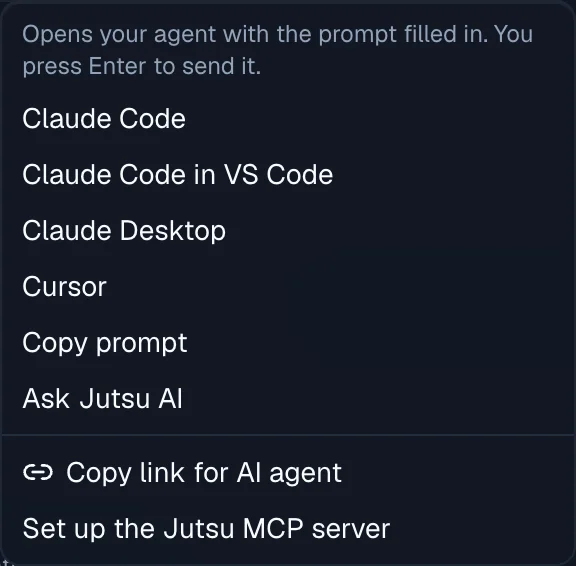
The same menu has:
- Copy prompt, for any other tool;
- Ask Jutsu AI, to work on it in the console;
- Copy link for AI agent, a link your agent can open through the Jutsu MCP server;
- Set up the Jutsu MCP server, for an agent that is not connected yet.
Your agent reads the finding through the Jutsu MCP server, as you, and never gets more access than your role. The Jutsu MCP server guide has the setup for each agent.
Paste a Jutsu link into your AI agent
The Jutsu MCP server has a new open_link tool. Paste a link to a cloud finding, risk, alert, incident, code security finding or connection into your agent, and it reads that item. For a cloud finding it returns a fix brief:
- the exact account, project or subscription and region the fix applies to;
- the commands to run, the command that confirms the fix, and the permissions it needs;
- how the agent checks that your local command line is signed in to that same account before it changes anything.
In Claude Code, /mcp__jutsu__fix_finding walks through a fix step by step, and recheck_cloud_finding asks Jutsu to check the finding again once it is fixed.
Each agent connection belongs to one organization. A link from another organization gets a clear answer that names the organization the agent is connected to, and Jutsu never looks the link up in another organization for it.
Fix steps, rewritten across Jutsu
Every fix in Jutsu was rewritten: the cloud, SaaS and server hardening checks, 228 alert guides, 30 risk guides, code security findings, and the remediation and false-positive guidance of 120 built-in detection rules. Each fix now:
- leads with the action, and links to the page where it happens, down to the exact resource in AWS, Google Cloud or Azure when Jutsu knows it;
- uses your real names. A cloud finding's fix names the bucket or the user, alert steps fill in the trail, user, repository or project from the alert itself, and risk summaries, device checks and the posture report use the resource's own names;
- adds the provider's own docs, a command that confirms the fix worked, a caution when a change can break something, and the permissions it needs.
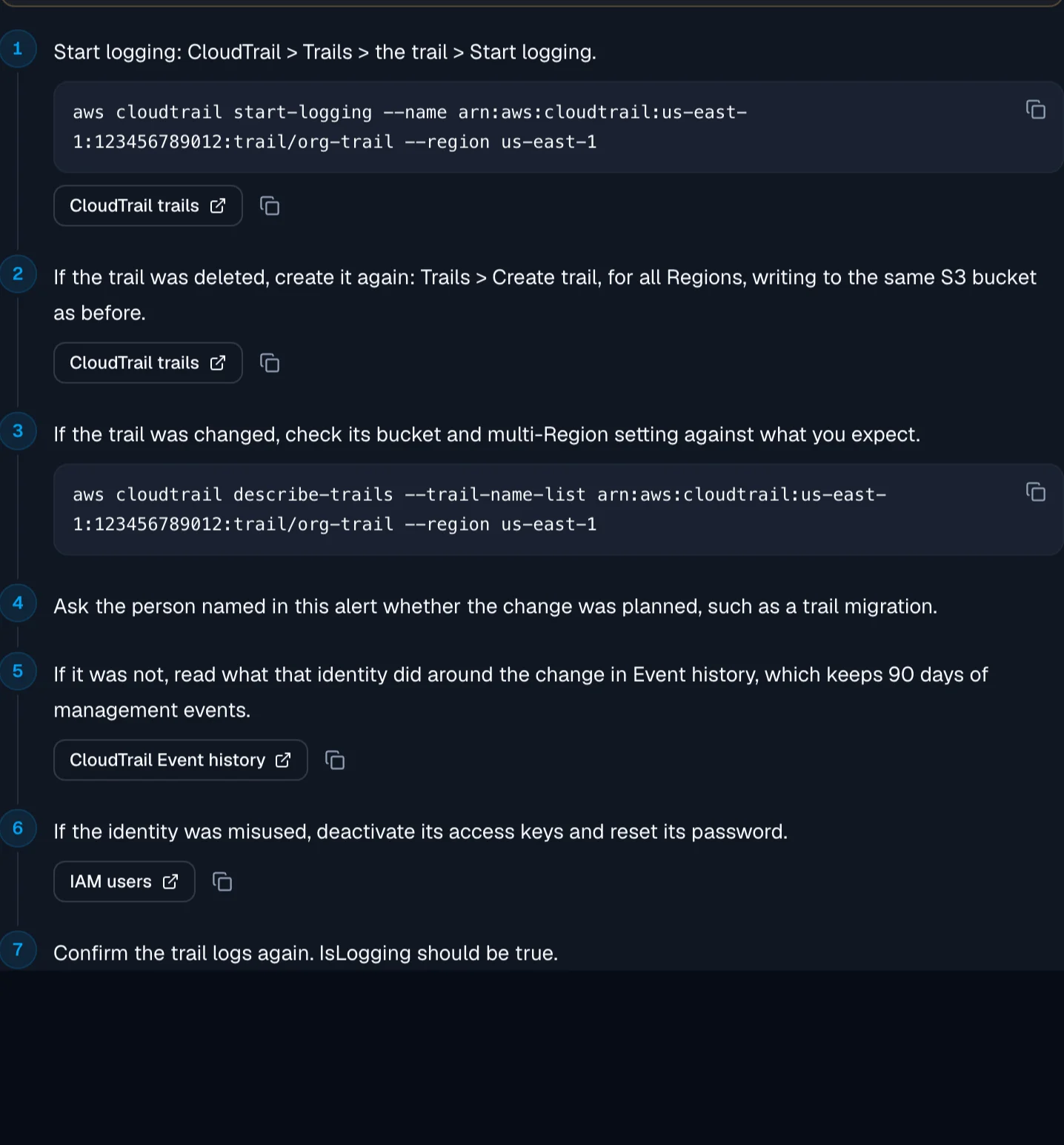
A value Jutsu cannot know becomes a box you fill in, and Copy waits until every value is valid. On a cloud finding, a button such as Open the bucket in AWS takes you straight to the resource, and the risk page puts that link on its first fix step.
Compliance to do in the Action Center
The Action Center's Needs you list now covers compliance too.
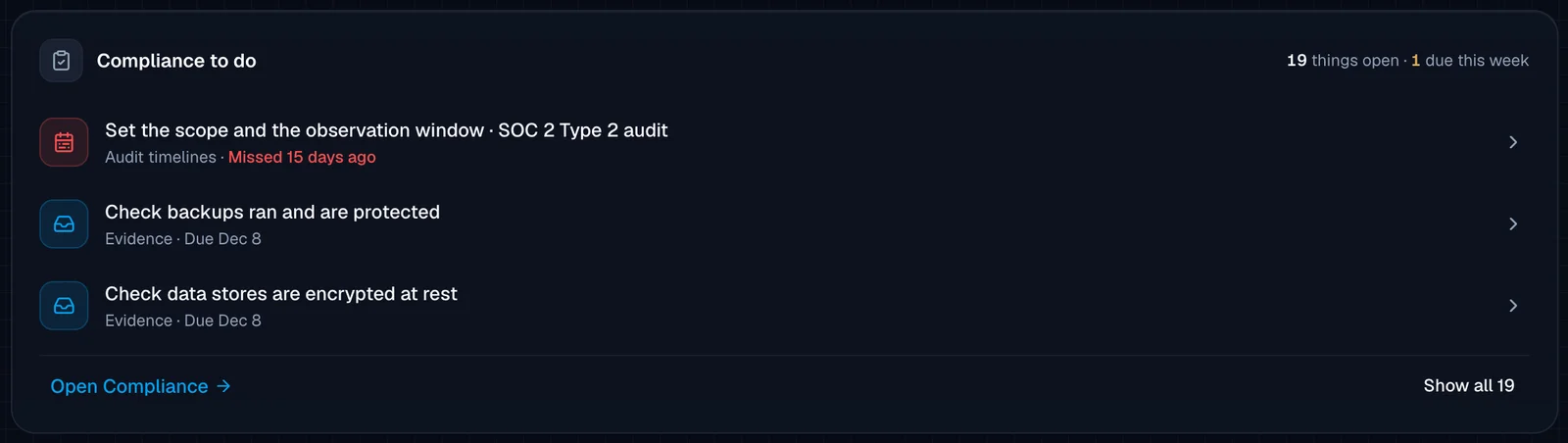
- Compliance to do shows your next three compliance tasks: policy approvals, evidence and documents due, vendor and risk reviews, audit findings and audit timelines. It counts how many are open and how many are due this week, and Show all opens the full list in place.
- One row for each failing check. Risks from one failing check on one connection fold into a single row, named the way the Risks list names the group, for example "Public access is allowed on 10 storage buckets". Open takes you to that group on the Risks page, and the arrow expands the row to show each risk.