Highlights
New features
- Microsoft Azure, on par with AWS: events, 19 detection rules, your Azure resources, 35 compliance checks and response actions, from one connection.
- Connect your AI agents through the Jutsu MCP server: Claude, Claude Code, Cursor and VS Code can read your risks, alerts and more, and never get more access than your role.
- Risks by connection type, and owners for whole groups: see where your risks come from, filter by connection type, and hand a whole group to one owner.
- Three new AWS rules, and Windows audit settings from the installer.
- Talk to Jutsu AI: speak your question instead of typing it.
Improvements
- Detection rules that see their events: more than 25 rules that could never fire at the default severity setting now can.
- Idle rules say why: a silent source, or one you have not connected.
- AWS and Cloudflare connections that explain themselves: a service you have not turned on is no longer reported as a failure.
- Pipeline Health and the dashboard's ingestion card judge a source by when its events arrive, and show how many were stored for rules.
- Supabase setting changes reach the Organization change feed within minutes instead of up to an hour, and each source switch on a Supabase connection says what it needs.
- The dashboard's "N things need you" opens the Needs you list on the Action Center, which shows exactly what it counts.
- Google Workspace: granting access to an app from your own Google Cloud project no longer raises an alert unless the app asks for broad access, and the connection page warns when the same Workspace is connected twice.
- Admins, not only owners, can now buy a plan and pay an invoice. Payment pages follow your console theme and show which workspace you are paying for.
- Risks and Incidents each have their own switch, so hiding Incidents leaves Risks visible.
Bug fixes
- Jutsu AI looks up your alerts, events and assets again. For about three weeks before November 2 those lookups failed, and answers came without your data.
- Jutsu AI no longer marks a complete answer as "The response stopped before it finished.", and a chat started near the end of a sign-in session keeps its data lookups.
- The notification bell says when your notifications could not load, instead of "You're all caught up".
- Viewers, and anyone exploring the Sandbox, no longer see "Forbidden" over a rules table that loaded fine.
- Fewer false alarms: "Security group opened to the world" no longer matches private ranges such as 10.0.0.0/8, and
sc query windefend,rsync -e sshand PowerShell's-Encodingargument no longer look like attacks. - On the Risks list, every title starts in the same place, and Compliance Integrations says "1 minute ago", not "1 minutes ago".
Docs
- New guide: Jutsu MCP server, with the steps for Claude, Claude Code, Cursor and VS Code.
- The Jutsu API page explains what replaces organization API keys.
- The Microsoft Azure guide and 11 other integration guides open with a walkthrough video.
Microsoft Azure, on par with AWS
Until this week, an Azure connection signed in, checked its roles, and read nothing else. Now it does what an AWS connection does, from the same connection page.
| Area | What Jutsu does with Azure |
|---|---|
| Events | Reads each subscription's Activity Log, and the alerts from Microsoft Defender for Cloud |
| Detection | 19 built-in Azure rules, each with fix steps |
| Assets | 12 kinds of Azure resources, among them storage accounts, network security groups, key vaults, SQL servers and web apps; the people and service principals that hold Azure roles; and your virtual machines, as machines |
| Compliance | 35 CIS-based checks. Defender for Cloud recommendations show up as findings, Jutsu collects Azure evidence for your controls, and the cloud account security report covers Azure |
| Response | Block an IP address with a network security group rule, isolate a VM, disable an Entra ID user and sign them out everywhere, and turn off public blob access, require HTTPS or set TLS 1.2 on a storage account |
Response actions run through a separate Jutsu Response app that you approve in your own tenant, apart from the app that reads. A collector installed on an Azure VM links itself to that VM. The connection page has what the other cloud connections have: a daily health check, a minimum severity, pause and resume, a choice of which data to bring in, and a cleanup step when you archive or delete the connection.
To start, open Connections and add Microsoft Azure. The Microsoft Azure guide walks through it, with a video.
Connect your AI agents through the Jutsu MCP server
Claude, Claude Code, Cursor, VS Code and other MCP clients can now connect to Jutsu. Your agent can read your risks with their fix steps, alerts, incidents, events, assets and compliance status. If you let it act, it can also re-check a risk after fixing it, update a risk, change an alert's status and comment on an incident.
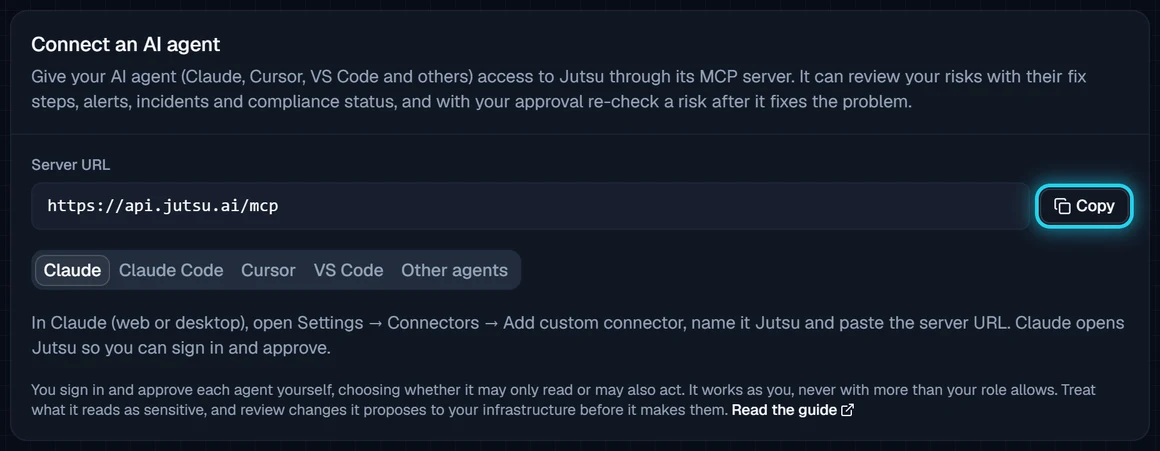
You sign in and approve each agent yourself, and choose whether it may only read or may also act. It works as you and never gets more access than your role. Set it up under Organization, then AI agents, where you can also see and disconnect the agents you have connected.
This replaces organization API keys, which Jutsu no longer has. Collector tokens work as before. The Jutsu MCP server guide has the steps for each client.
Risks by connection type, and owners for whole groups
The Risks page now opens with Active risks by connection type: one bar per kind of connection, split by severity, largest first. It shows at a glance whether your open risks sit mostly in your cloud, your identity provider or your code, and you can filter the list below to one connection type.
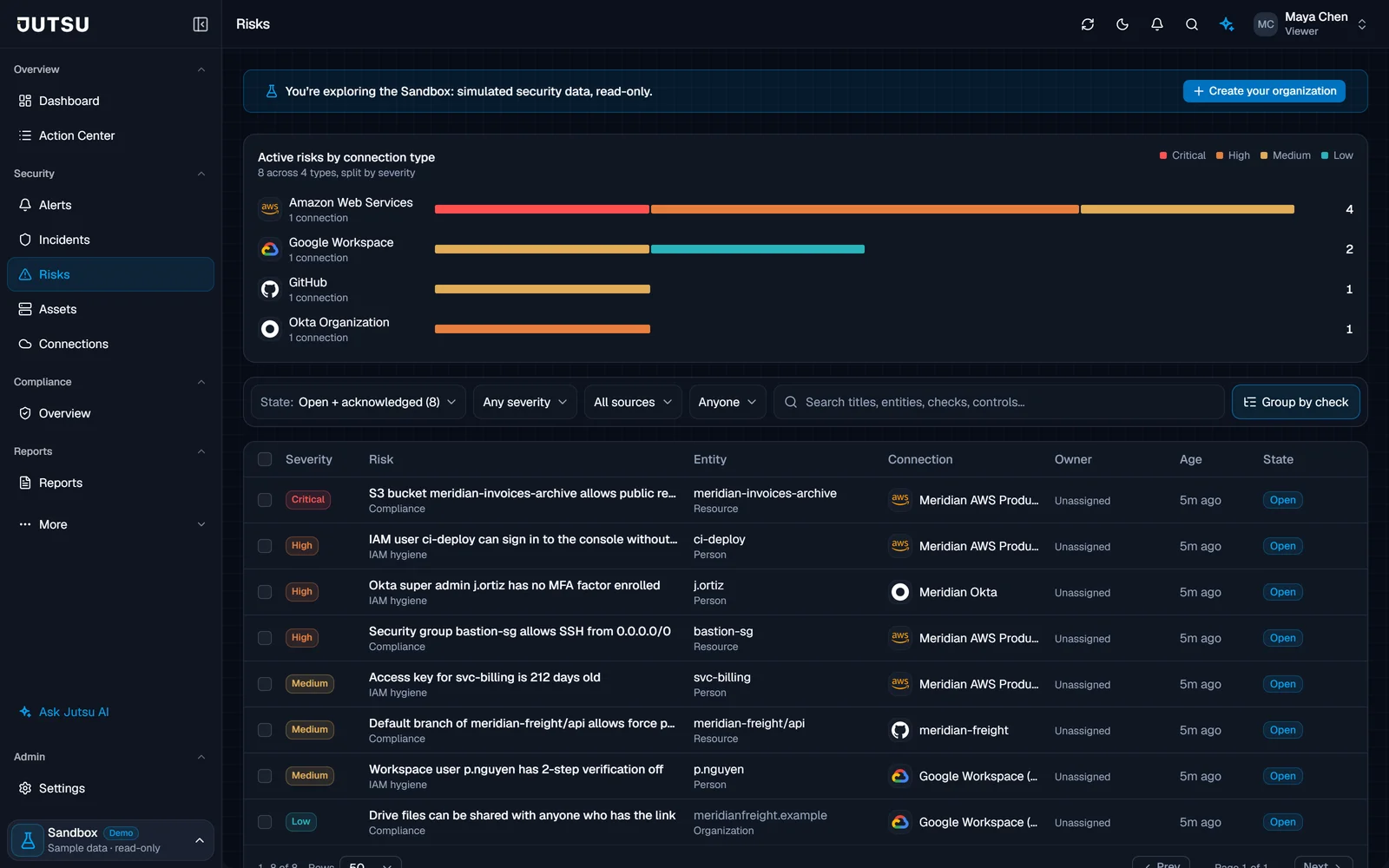
Ownership got easier too:
- Owners for whole groups. With Group by check on, giving a group an owner assigns every risk in it, however large, and its risks show the new owner right away. Unassigning the group clears all of them.
- Owners hear about it. Assigning a risk notifies its new owner by email and in the console. Assigning several at once, or a whole group, sends one message. It is on by default, under Risks in your notification settings.
Detection rules that see their events
Every connection has a Minimum severity, Medium by default, and events below it are not stored. Many of the events Jutsu's built-in rules read were graded below Medium, so at the default setting those rules could never fire. A CloudTrail call that opens a security group to the world was one of them. Those events now pass the default setting, and the rules below can fire without you changing anything.
| Source | Rules that now see their events |
|---|---|
| AWS CloudTrail | 9, among them Security group opened to the world, S3 bucket made public, GuardDuty disabled and Account password policy weakened |
| Windows event logs | 8 of the 12 built-in Windows rules, among them Account created and granted admin, and Privileged group membership added |
| Process command lines on Windows, Linux and macOS | 6: Suspicious PowerShell execution, LOLBin remote download, Credential dumping (LSASS), Endpoint security tooling tampering, Shadow copy / backup deletion and Linux reverse shell. Sysmon process events feed them too |
| Sign-ins from Okta, Microsoft 365, Cloudflare Access, 1Password, Bitwarden and LastPass | 3: Failed logins followed by success, Impossible travel and Anomalous login behavior |
| Google Cloud audit logs | 3: privileged role granted, firewall rule opened to the internet and long-lived credential created, which now match Google's real records |
| Cloudflare, Vercel, Okta, Bitwarden, Docker and web sources | Log delivery and rate-limit changes, Access changes, Worker deployments, MFA push denials, secrets read from the CLI, and web attack signatures in URLs |
"S3 bucket made public" also catches a bucket policy that allows everyone, and Block Public Access being removed.
Pipeline Health shows the other side of it: for each source, how many events were stored for rules, judged by when they arrive. A source whose events all fall below its Minimum severity no longer shows as down.
Three new AWS rules, and Windows audit settings from the installer
Three AWS CloudTrail rules join the catalog:
- Assume-role trust policy widened.
- VPC Flow Logs disabled.
- Secrets Manager secret accessed, for secrets read by a person rather than an application. It is off by default; turn it on under Rules.
On Windows, the collector installer now turns on the audit settings Jutsu's Windows rules read: process creation with command lines, scheduled tasks, account and group changes, audit policy changes and logons. It prints every setting it changes, and -SkipAuditPolicy leaves the host's audit policy alone. Re-run the installer on hosts that already have the collector to apply the settings.
Idle rules say why
When a rule is idle, the Rules page now says why.
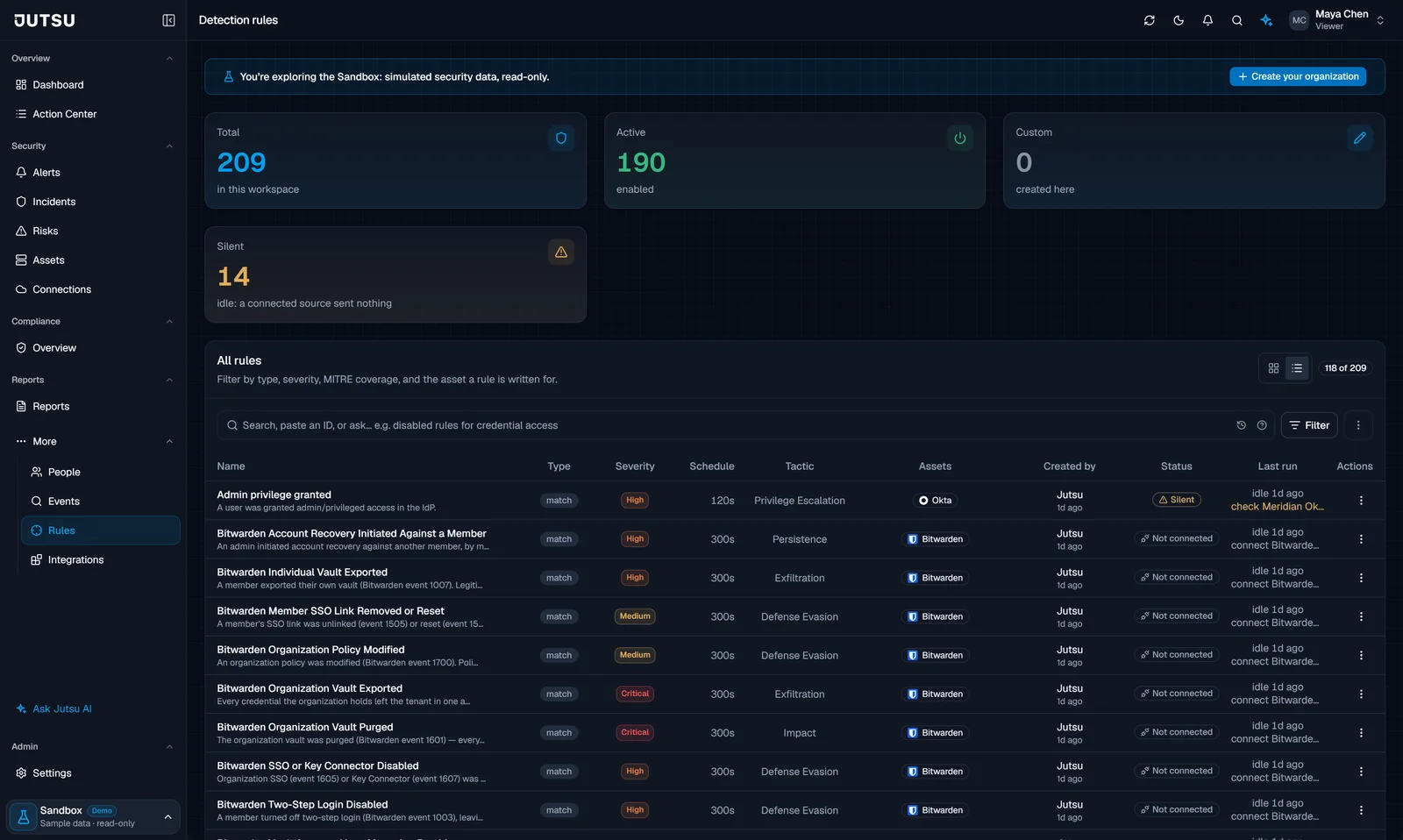
- Silent means a source you connected sent nothing in the last 24 hours. The rule links to that connection.
- Not connected means you have not connected that source. These rules are folded away by default, and the State filter shows them.
Talk to Jutsu AI
Jutsu AI's message box has a microphone next to Send. Speak your question, up to two minutes, and the text lands in your draft for you to check. It never sends on its own. The X beside it, or Esc, throws the recording away. The audio is not stored.
AWS and Cloudflare connections that explain themselves
Some connections reported a failure when nothing was broken:
- AWS. When GuardDuty or Security Hub is not turned on, or not available on the AWS account's plan, the connection page now says so in a neutral note with links to turn them on, instead of a "Needs attention" warning with a re-check that could never pass.
- Cloudflare. An account that does not use Zero Trust Access is no longer an error. The page reads "Access sign-ins: not in use", and a refused permission names the token permission to add.
One failing log type also no longer slows the others. Before, when one of a connection's log types failed, the healthy ones backed off with it, down to about one poll an hour. Now each log type keeps its own pace.