
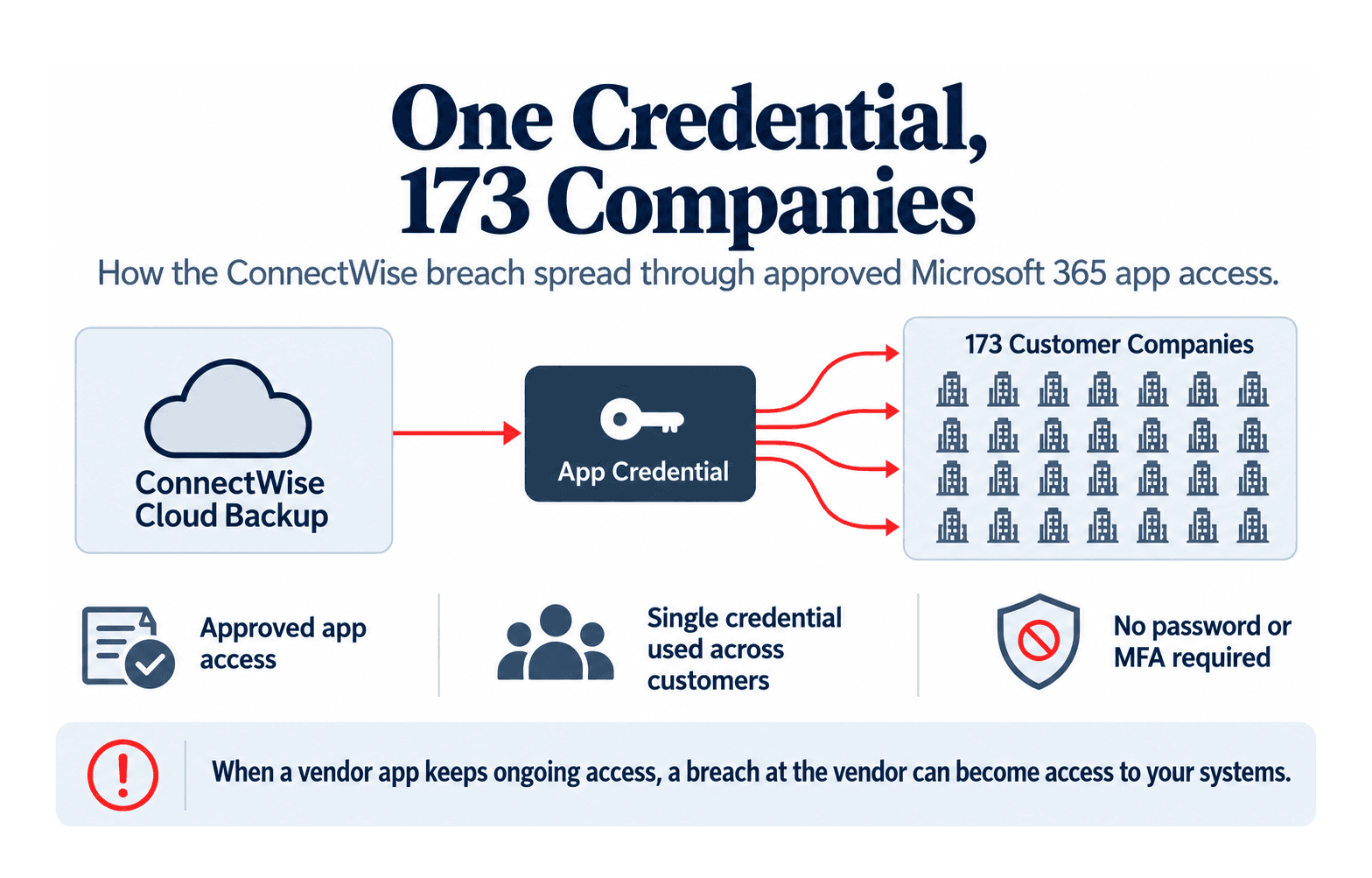
Between October 13 and 15, 2026, attackers used a stolen ConnectWise credential to sign in to the Microsoft 365 accounts of at least 173 companies. The credential belonged to ConnectWise Cloud Backup, an app approved to access their email, files and Teams chats. Because the attackers signed in as the app instead of as an employee, they did not need a password or multi-factor authentication.
What happened to ConnectWise customers can happen to any company that relies on outside tools. When you connect a vendor’s tool to your company’s systems, you give that vendor ongoing access to your data, and an attacker who breaches the vendor can use that access to reach you.
173 Companies with Just One Credential
ConnectWise Cloud Backup, formerly called SkyKick, backs up Microsoft 365 data. When a company approves the app, it grants permission to read mailboxes, OneDrive, SharePoint, Teams and directory data, and the app then uses its own credential to request that access from Microsoft each time it runs a backup.
Because the app used one credential for all of its customers, anyone holding the credential could reach every one of them. ConnectWise has not yet said how the attackers obtained it.
A normal backup
During a normal backup, ConnectWise’s own service uses the credential to reach each company that approved the app.
October 15, 2026
On October 15, the attackers used the same credential to reach those companies one after another, a few seconds apart, which Huntress said points to a script working through a list of targets.
Five Days in October
- Oct 13–14
Password guessing at four law firms
Huntress, the security firm that investigated the activity, found that the IP address later used in the attack had tried to guess passwords at four law firms, though none of the attempts succeeded.
- Oct 14
ConnectWise detects the issue
ConnectWise says it detected the issue on October 14, a day before the main activity began.
- Oct 15, Morning
Scripted sign-ins
Between 06:13 and 08:34 UTC, the attackers requested access to customer accounts one after another, a few seconds apart.
- Oct 15, Afternoon
Targeted activity
After the scripted run ended, the attackers kept working against specific companies by hand until about 14:20 UTC.
- Oct 17
Cloud Backup suspended
ConnectWise disabled seven of its app connections and suspended Cloud Backup for all customers, and it took two related services offline while it investigates.
173companies with confirmed unauthorized sign-ins
~1,000Microsoft 365 accounts with activity from the attacker’s IP address
~300of those sign-ins that succeeded
Figures from Huntress.
From Reading Company Data to Taking Admin Control
The attackers could read anything the app could read, but Huntress and Microsoft found that they also tried to keep their access after the credential was shut off.
Select a step to see what was found at each level.
With the backup app’s permissions, the attackers could open mailboxes, OneDrive and SharePoint files, Teams chats and directory data.
In nearly 50 companies, related ConnectWise apps assigned themselves administrator roles, most often Exchange Administrator.
In one company, a ConnectWise Teams app made itself a Global Administrator, and a script then added new credentials to an IT management tool and to Huntress’s own security app.
Microsoft observed the attackers mapping company directories and trying to add credentials to other apps, which would let them return after the original credential stopped working.
Todyl, another security firm, reviewed nine affected companies and found sign-ins but no new accounts or permission changes. ConnectWise also says it has found no evidence that backup data was accessed, so how much data was taken is still unknown.
Why MFA Did Not Stop the Attack
Multi-factor authentication confirms that the person signing in is who they claim to be. A connected app skips that step because it signs in with its own secret key or certificate, and once a company approves the app, the access stays in place until someone removes it.
This also changes how the activity appears in logs and how it can be stopped.
App sign-ins are listed separately
Microsoft Entra lists app sign-ins under a separate “Service principal sign-ins” tab, so a team that only reviews user sign-ins would not see them.
Password resets do not remove access
Because the access belongs to the app rather than to a person, resetting passwords or signing users out has no effect on it.
Disabling the app is not immediate
Disabling the app blocks new access, but access that was already granted can keep working for up to 90 minutes. Any credentials or roles the attacker added also stay in place until someone finds and removes them.
Check Your Own Connected Apps
Startups usually approve apps as they need them, whether that is a CRM or a scheduling tool, and they rarely revisit those approvals. Each approved app keeps ongoing access to company data, so if its vendor is breached, an attacker can use that access in the same way.
How Jutsu Can Help
Jutsu monitors your connected cloud, identity, code and endpoint systems around the clock and logs every alert, investigation and response as it happens. When an app or account signs in from somewhere unexpected or receives new permissions, your team can see it and respond, and you keep a record of what happened.
Learn More About JutsuQuestions About the Breach
Was my company affected if we do not use ConnectWise?
Only companies that had approved ConnectWise Cloud Backup or a related ConnectWise Cloud Management app in Microsoft 365 were exposed. In older accounts, these apps may still appear under the name “SkyKick.”
How can I check whether ConnectWise apps signed in to my account?
In the Microsoft Entra admin center:
- Go to Monitoring and open Sign-in logs.
- Select the Service principal sign-ins tab.
- Filter by the Cloud Backup application ID:
506e08f9-6e9a-4da4-942b-a099a03644ae - Look for activity from October 13, 2026 onward, especially from
144.172.64.128, the IP address used in the attack.
Huntress recommends keeping the ConnectWise apps disabled until ConnectWise confirms that all of its credentials have been replaced.